
Email Regex Validation - And What to Do When It's Not Enough
Regex checks format. BoltRoute checks if the email actually exists.
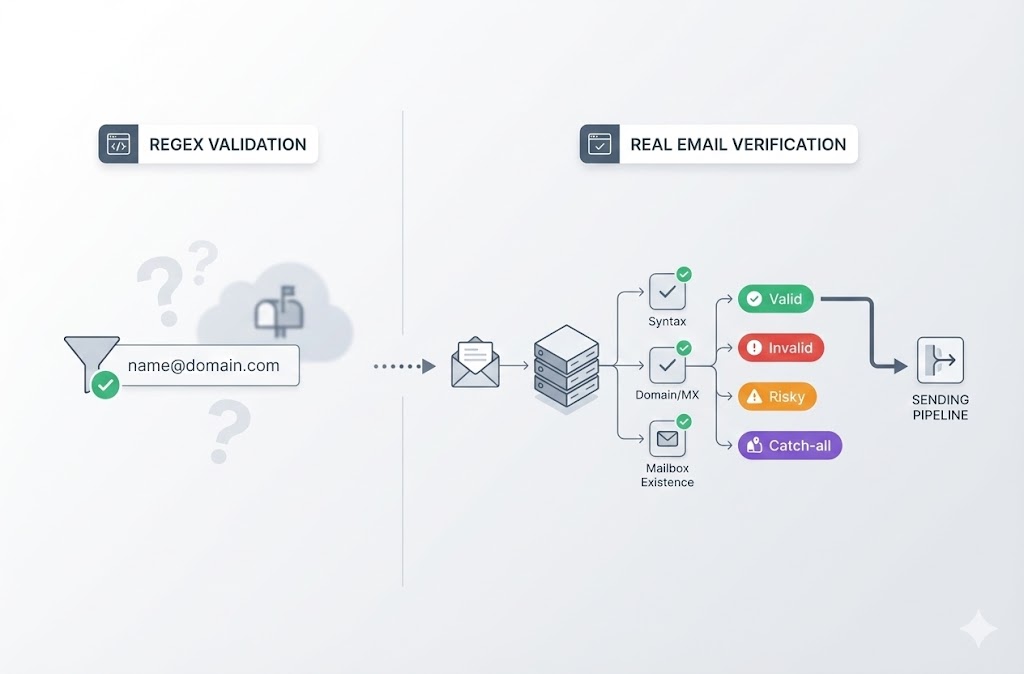
Regex Isn't Enough. Verify for Real
Check mailbox existence and domain health before you send.
Validate syntax, domain health, and mailbox existence in one API call with no regex maintenance.
No credit card required.
The Problem with Regex-Only Email Validation
Regex catches typos. It does not catch bad addresses.
Format is not validity.
An address like john.smith@company.com can pass regex but still fail in production because the mailbox does not exist, the domain is dead, or it is a catch-all.
The real costs:
- Bounces spike and sender reputation drops
- You burn credits sending to addresses that were never real
- Maintaining edge-case regex patterns consumes engineering time
Regex is a filter. It is not verification.
Go Beyond Regex with Real Email Verification
BoltRoute verifies addresses against live mail servers, not just pattern matching.
One API call returns syntax validation, domain health, MX status, and mailbox existence. It works from any language that supports HTTP.
Keep regex for client-side instant feedback. Use BoltRoute for the final truth before sending.
What BoltRoute Checks (That Regex Can't)
| Feature | What It Does | Why It Matters |
|---|---|---|
| SMTP Validation | Connects to mail servers and checks mailbox acceptance | Catches invalid addresses that pass regex |
| Domain Health Check | Verifies MX records, DNS configuration, and domain status | Prevents sends to dead or misconfigured domains |
| Risk Scoring | Flags catch-alls, role-based addresses, and disposables | Helps you decide how to handle risky contacts |
| Webhook Callbacks | Returns asynchronous results for workflow automation | Fits verification into existing pipelines |
| REST API | Returns consistent statuses: Valid, Invalid, Risky, Catch-all, Role-based, Disposable | Removes regex maintenance and guesswork |
Get Started in 3 Steps
- Sign up free
Get 100 verifications instantly with no credit card required. - Verify your way
Use the REST API, upload CSV or Excel files, or connect via Zapier, n8n, or Google Sheets. - Send with confidence
Only send to addresses marked valid and protect your sender reputation.
Built for Developers Who Ship
Clear results
Every address returns Valid, Invalid, Risky, Catch-all, Role-based, or Disposable.
Workflow-ready
Use Zapier, n8n, Google Sheets, or direct API integrations.
Risk-free start
100 free verifications with no credit card required.
Simple Pricing. Credits Never Expire.
| Plan | Credits | Price |
|---|---|---|
| Free | 100 | $0 |
| Basic | 10,000 | $29/mo |
| Professional | 100,000 | $129 |
| Enterprise | 500,000 | $279 |
| Custom | 1M+ | Contact us |
No subscriptions that reset. No credits that vanish.
Stop Guessing. Start Verifying.
Email regex tells you format looks right. BoltRoute tells you the address is real.
Get 100 free verifications and see what regex misses.
Frequently Asked Questions
Is email regex enough for validation?
Regex validates format. It confirms an address has an at-sign, a valid TLD, and no illegal characters. But regex cannot tell you whether the mailbox exists, whether the domain is active, or whether the address is a catch-all. For sending, you need verification against the actual mail server.
How does BoltRoute compare to building my own email validation regex?
BoltRoute goes beyond pattern matching. Instead of maintaining complex regex libraries, you call one API endpoint and get SMTP validation, domain health, and risk scoring. You get a definitive result: Valid, Invalid, or Risky.
Can I use BoltRoute for Python email validation or other languages?
Yes. BoltRoute's REST API works with any language that can make HTTP requests, including Python, Node.js, Ruby, Go, and PHP. No SDK is required.
What's the difference between IMAP vs POP3 vs SMTP for email validation?
IMAP and POP3 are retrieval protocols used to fetch emails. SMTP is the sending protocol and is what matters for verification. BoltRoute uses SMTP-level checks to confirm whether a mailbox can receive mail.
Do you check DMARC or other DNS records?
BoltRoute checks domain health, including MX records and DNS configuration. For dedicated DMARC monitoring and reporting, you would typically use a specialized tool, but BoltRoute flags missing or misconfigured records that affect deliverability.
What results does BoltRoute return?
Each verification returns a clear status: Valid, Invalid, Risky, Catch-all, Role-based, or Disposable. You also get diagnostics like SMTP response, domain health, and risk score.
Email Verification Built for Developers
Drop regex maintenance and verify via API or workflows.