Hard Bounce vs Soft Bounce: What They Mean and How to Prevent Both (2026)
11 January 2026
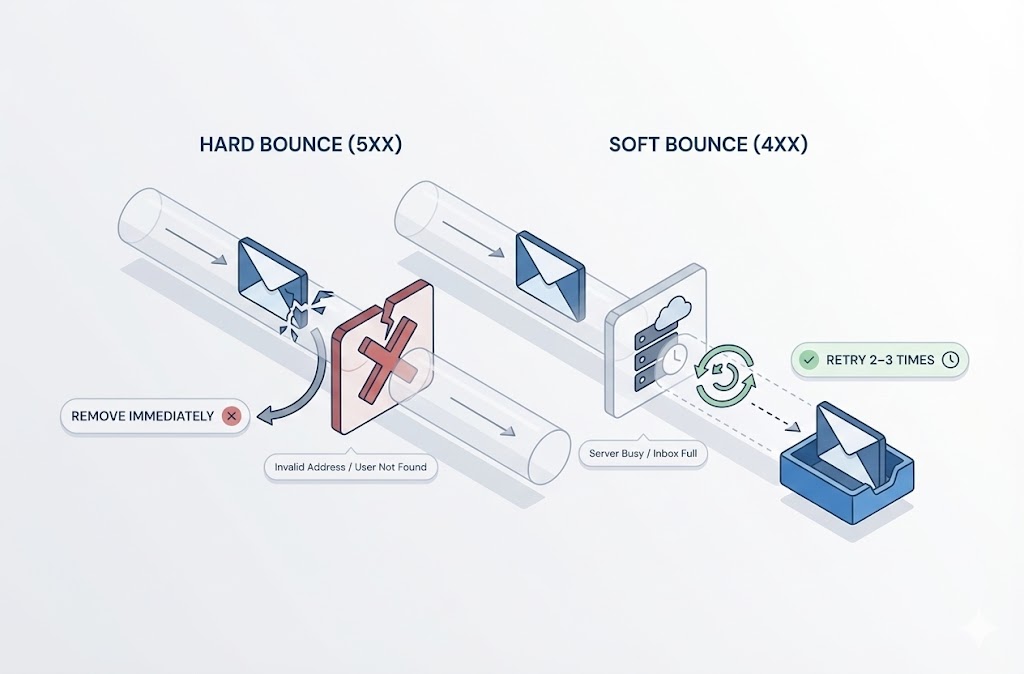
A hard bounce is a permanent email delivery failure caused by an invalid address. A soft bounce is a temporary failure caused by issues like a full inbox or server downtime. Hard bounces require immediate removal from your list. Soft bounces may resolve on retry—remove addresses only after 2–3 consecutive failures.
Table of Contents
- What Is an Email Bounce?
- What Is a Hard Bounce in Email?
- What Is a Soft Bounce Email?
- Hard Bounce vs Soft Bounce: Key Differences
- What Is a Good Email Bounce Rate?
- How Email Bounces Affect Sender Reputation
- How to Check if an Email Will Bounce Before Sending
- How to Reduce Email Bounce Rate
- Frequently Asked Questions
- Should I remove hard bounces from my email list?
- What is an example of a hard bounce?
- What is an example of a soft bounce?
- Why is my email hard bouncing?
- How do soft bounces affect email marketing campaigns?
- Can a soft bounce become a hard bounce?
- What's the difference between bounce rate and spam complaint rate?
- How long should I wait before removing a soft-bounced address?
- Does email verification guarantee zero bounces?
Key Takeaways:
- Hard bounce = permanent: The email address doesn’t exist or the domain is invalid. Remove it immediately.
- Soft bounce = temporary: The recipient’s server had a momentary issue. Retry before removing.
- Bounce rate target: Keep total bounces under 2% to protect sender reputation.
- Prevention beats reaction: Email verification before sending eliminates most hard bounces.
- ISPs are watching: Gmail, Yahoo, and Microsoft track your bounce rates to decide inbox placement.
A bounce rate above 2% signals to email providers that you’re sending to low-quality lists. This damages your sender reputation and pushes future emails toward spam folders—even to valid addresses.
What Is an Email Bounce?
An email bounce is a message that fails to reach the recipient’s inbox and returns to the sender. When you send an email, the recipient’s mail server either accepts it or rejects it. A rejection triggers a bounce notification—also called a Non-Delivery Report (NDR) or Delivery Status Notification (DSN).
Think of it like sending a physical letter to an address that doesn’t exist. The postal service returns it to you with a note explaining why delivery failed.
Every bounce message contains an error code that explains the failure. These codes follow a standard format:
| Code Range | Category | Meaning |
|---|---|---|
| 5XX | Hard bounce | Permanent failure — address invalid, domain doesn’t exist, or delivery blocked |
| 4XX | Soft bounce | Temporary failure — server busy, inbox full, or message deferred |
Common examples you might see in bounce reports:
- 550 User not found — The email address doesn’t exist (hard bounce)
- 552 Mailbox full — Recipient’s inbox has no space (soft bounce)
- 421 Try again later — Server temporarily unavailable (soft bounce)
Understanding what causes an email to bounce helps you diagnose list quality issues before they damage your sender reputation. The two main categories—hard bounces and soft bounces—require different responses.
What Is a Hard Bounce in Email?
A hard bounce is a permanent email delivery failure that will never succeed regardless of retry attempts. The receiving mail server has rejected your message for a reason that cannot be resolved—typically because the email address or domain is invalid.
When an email hard bounces, you receive an error code in the 5XX range. This tells you the address is dead. Continuing to send to hard-bounced addresses wastes resources and actively damages your sender reputation.
The rule is simple: Remove hard-bounced addresses from your list immediately. No exceptions. No retries.
Common Causes of Hard Bounces
Hard bounces result from permanent issues with the recipient address or domain. Here are the most common causes:
1. Email address doesn’t exist
The recipient address was never created, or the account was deleted. This is the most common hard bounce cause.
- Someone gave you a fake address during signup
- The person left the company and their account was removed
- You have an old list with abandoned addresses
2. Domain doesn’t exist
The domain portion of the email (everything after @) is invalid. Either the domain was never registered, or it expired.
- Typos:
@gmial.cominstead of@gmail.com - Company went out of business
- Domain registration lapsed
3. Email server blocked your message
The recipient’s mail server permanently rejected your email. This happens when:
- Your sending domain or IP is blacklisted
- Your domain lacks proper authentication (SPF, DKIM, DMARC)
- The recipient’s organization blocked your domain specifically
4. Invalid email format
The email address contains characters or formatting that violate email standards:
- Missing @ symbol
- Spaces in the address
- Invalid special characters
5. Recipient server doesn’t accept email
Some domains exist but have no mail server configured. The MX (mail exchange) records are missing or misconfigured, so no email can be delivered.
| Hard Bounce Cause | Example Error | What It Means |
|---|---|---|
| Address doesn’t exist | 550 User unknown | Delete this address—it’s not real |
| Domain doesn’t exist | 550 Host not found | Check for typos or delete |
| Blocked by server | 550 Message rejected | You may be blacklisted—investigate |
| Invalid format | 550 Invalid address syntax | Address has typos or bad characters |
| No mail server | 550 No MX record | Domain can’t receive email at all |
Why would an email bounce permanently? In every case above, the problem isn’t temporary. The address is either fundamentally broken or permanently unreachable from your domain. No amount of waiting or retrying will fix it.
What Is a Soft Bounce Email?
A soft bounce is a temporary email delivery failure that may succeed if you retry later. The recipient’s email address is valid, but something prevented delivery at that moment—a full inbox, an overloaded server, or a message that exceeded size limits.
When an email soft bounces, you receive an error code in the 4XX range. This signals a temporary problem, not a permanent rejection. The address itself isn’t broken.
The rule for soft bounces: Retry 2–3 times over 24–72 hours. If delivery keeps failing, treat it as a hard bounce and remove the address.
Common Causes of Soft Bounces
Soft bounces result from temporary issues with the recipient’s mailbox or server. Here are the most common causes:
1. Recipient inbox is full
The mailbox has reached its storage limit. No new messages can be delivered until the recipient deletes old emails. This is especially common with:
- Free email accounts (limited storage)
- Abandoned accounts no one monitors
- Users who never clean their inbox
2. Mail server temporarily unavailable
The recipient’s email server is down for maintenance, overloaded, or experiencing technical issues. The server tells your mail system to try again later.
3. Message too large
Your email exceeds the recipient server’s size limit. This happens when:
- Attachments are too large
- Embedded images push the message over the limit
- The recipient’s server has strict size restrictions
4. Temporary spam or security block
The recipient’s server flagged your message as suspicious but didn’t permanently reject it. This can happen if:
- Your email triggered spam filters
- Your sending IP has a borderline reputation
- The content matches patterns associated with spam
5. Auto-reply loop or configuration issue
Some misconfigured mail servers generate bounces when processing auto-replies, vacation messages, or forwarding rules. These are technical glitches, not address problems.
6. DNS lookup failure
The sending server couldn’t resolve the recipient’s domain temporarily. This is rare but happens during DNS outages or propagation delays.
| Soft Bounce Cause | Example Error | What to Do |
|---|---|---|
| Inbox full | 452 Mailbox full | Retry in 24–48 hours |
| Server unavailable | 421 Service temporarily unavailable | Retry in a few hours |
| Message too large | 452 Message exceeds size limit | Reduce attachment size and resend |
| Temporary block | 450 Requested action not taken | Check content and reputation, then retry |
| DNS failure | 451 Temporary DNS error | Retry—usually resolves automatically |
What does soft bounce mean in email marketing? It means you have a second chance. Unlike hard bounces, soft bounces don’t indicate a dead address. But repeated soft bounces to the same address suggest the mailbox is abandoned or permanently full—at which point you should remove it.
Most email service providers automatically retry soft bounces for you. Check your platform’s retry policy so you understand when addresses get flagged for removal.
Hard Bounce vs Soft Bounce: Key Differences
Hard bounces and soft bounces require completely different responses from email marketers. One is a permanent problem demanding immediate action. The other is a temporary issue that often resolves itself.
Here’s how they compare:
| Factor | Hard Bounce | Soft Bounce |
|---|---|---|
| Definition | Permanent delivery failure | Temporary delivery failure |
| Error code | 5XX (e.g., 550, 551, 553) | 4XX (e.g., 450, 451, 452) |
| Root cause | Invalid address, domain doesn’t exist, permanent block | Full inbox, server down, message too large |
| Will retry work? | No — never | Yes — often succeeds later |
| Recommended action | Remove from list immediately | Retry 2–3 times, then remove if still failing |
| Reputation impact | Severe — signals bad list hygiene | Moderate — acceptable in small numbers |
| Target rate | Under 0.5% | Under 1.5% |
| Example scenario | Employee left company, email deleted | Recipient on vacation, inbox full |
| Prevention method | Email verification before sending | Limited — mostly outside your control |
The critical distinction: Hard bounces indicate a problem with your list quality. Soft bounces indicate a problem with timing or circumstances.
A high hard bounce rate tells ISPs you’re sending to addresses you never verified—a hallmark of spammers and purchased lists. A moderate soft bounce rate is normal and expected, especially when emailing large lists.
When soft bounces become a problem:
Repeated soft bounces to the same address over multiple campaigns suggest the mailbox is abandoned. Most email service providers automatically convert these to hard bounces after several failed attempts. If yours doesn’t, create a rule: three consecutive soft bounces equals removal.
What Is a Good Email Bounce Rate?
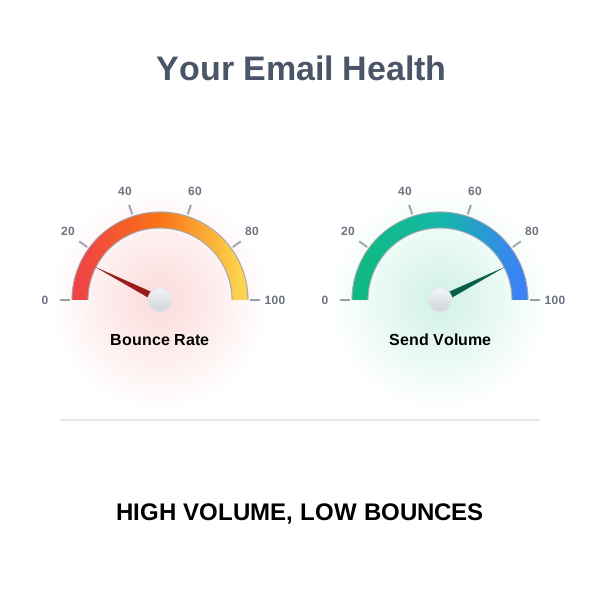
A good email bounce rate is below 2% of total emails sent. This means out of every 100 emails, no more than 2 should bounce back. Rates above 2% signal list quality problems and put your sender reputation at risk.
For stricter list hygiene, aim for these targets:
- Hard bounce rate: Under 0.5%
- Soft bounce rate: Under 1.5%
- Total bounce rate: Under 2%
How to Calculate Email Bounce Rate
Email bounce rate is calculated by dividing bounced emails by total emails sent, then multiplying by 100.
Formula:
Bounce Rate = (Bounced Emails ÷ Emails Sent) × 100
Example:
You send 10,000 emails. 150 bounce back (120 soft bounces + 30 hard bounces).
Bounce Rate = (150 ÷ 10,000) × 100 = 1.5%
This 1.5% total bounce rate is healthy. But look deeper: your hard bounce rate is 0.3% (30 ÷ 10,000 × 100), which is excellent. Your soft bounce rate is 1.2%, which is acceptable.
Bounce Rate Benchmarks by Situation
| Bounce Rate | Assessment | Action Needed |
|---|---|---|
| Under 0.5% | Excellent | Maintain current list hygiene practices |
| 0.5% – 2% | Acceptable | Monitor trends, clean list quarterly |
| 2% – 5% | Problematic | Clean list immediately, verify new signups |
| Above 5% | Critical | Stop sending, verify entire list before resuming |
Why 2% Matters
Major email providers monitor your bounce rates to assess sender reputation. Consistently high bounces tell Gmail, Yahoo, and Microsoft that you’re not maintaining your list—a behavior associated with spammers.
The consequences escalate:
- First: More emails land in spam folders
- Then: Email providers throttle your sending speed
- Finally: Your domain or IP gets blacklisted
A single campaign with a 10% bounce rate can undo months of good sender reputation. This is why verification before sending matters more than cleanup after bouncing.
How Email Bounces Affect Sender Reputation
Email bounces directly damage your sender reputation score with major email providers. Every time an email bounces, Gmail, Yahoo, and Microsoft record it against your sending domain and IP address. High bounce rates tell these providers you’re not maintaining a clean list—a behavior pattern shared by spammers.
Sender reputation determines whether your emails reach the inbox or get filtered to spam. It’s a score (often 0–100) calculated from signals including:
- Bounce rates (hard and soft)
- Spam complaints
- Engagement metrics (opens, clicks)
- Sending volume patterns
- Authentication status (SPF, DKIM, DMARC)
Bounces are one of the fastest ways to destroy this score.
How ISPs Use Bounce Data
Major email providers have explicit requirements for senders. Exceed their thresholds and your deliverability suffers.
Gmail requires bulk senders to keep spam complaint rates below 0.3% and recommends monitoring bounces through Google Postmaster Tools. High bounce rates combined with low engagement trigger spam filtering. (Gmail sender guidelines)
Yahoo evaluates sender reputation based on complaint rates, bounce rates, and engagement. Lists with high bounces signal poor acquisition practices. (Yahoo sender best practices)
Microsoft announced in 2024 that high-volume senders must authenticate with SPF, DKIM, and DMARC. Poor list hygiene—evidenced by bounce rates—factors into filtering decisions. (Microsoft sender requirements)
The Reputation Damage Cycle
High bounce rates trigger a downward spiral that affects even your valid recipients.
- Bounces accumulate — ISPs record each failed delivery
- Reputation drops — Your sender score decreases
- Filtering increases — More emails go to spam, even to valid addresses
- Engagement drops — Recipients don’t see your emails, so they don’t open them
- Reputation drops further — Low engagement reinforces the negative signal
- Throttling or blocking — ISPs limit or reject your emails entirely
This cycle explains why a neglected list causes problems beyond just the invalid addresses. Poor list hygiene punishes your entire email program.
Hard Bounces vs Soft Bounces: Reputation Impact
| Bounce Type | Reputation Impact | Why |
|---|---|---|
| Hard bounce | Severe | Signals you’re emailing addresses you never verified—a spam indicator |
| Soft bounce | Moderate | Temporary issues are expected; only damages reputation if chronic |
| Repeated soft bounces | Severe | Shows you’re not removing problem addresses from your list |
A few soft bounces per campaign won’t hurt you. A few hard bounces will. And ignoring either type—letting bounced addresses stay on your list—compounds the damage with every send.
How to Check if an Email Will Bounce Before Sending
Email verification detects invalid addresses before they damage your sender reputation. Instead of discovering bad addresses through bounces, you identify and remove them before clicking send. This is the difference between prevention and damage control.
Most hard bounces are preventable. The addresses that will fail—invalid syntax, nonexistent domains, deleted accounts—can be detected in advance with the right verification process.
What Email Verification Checks
A proper email verification process validates multiple layers of an email address:
1. Syntax validation
Checks if the email follows proper formatting rules. Catches typos and formatting errors like:
- Missing @ symbol
- Spaces in the address
- Invalid characters
2. Domain verification
Confirms the domain exists and can receive email:
- DNS lookup to verify the domain is registered
- MX record check to confirm mail servers exist
- Domain health assessment
3. SMTP validation
Connects to the recipient’s mail server to verify the specific mailbox exists—without sending an actual email. This catches:
- Deleted accounts
- Nonexistent usernames
- Disabled mailboxes
4. Additional risk detection
Identifies addresses that are technically valid but risky:
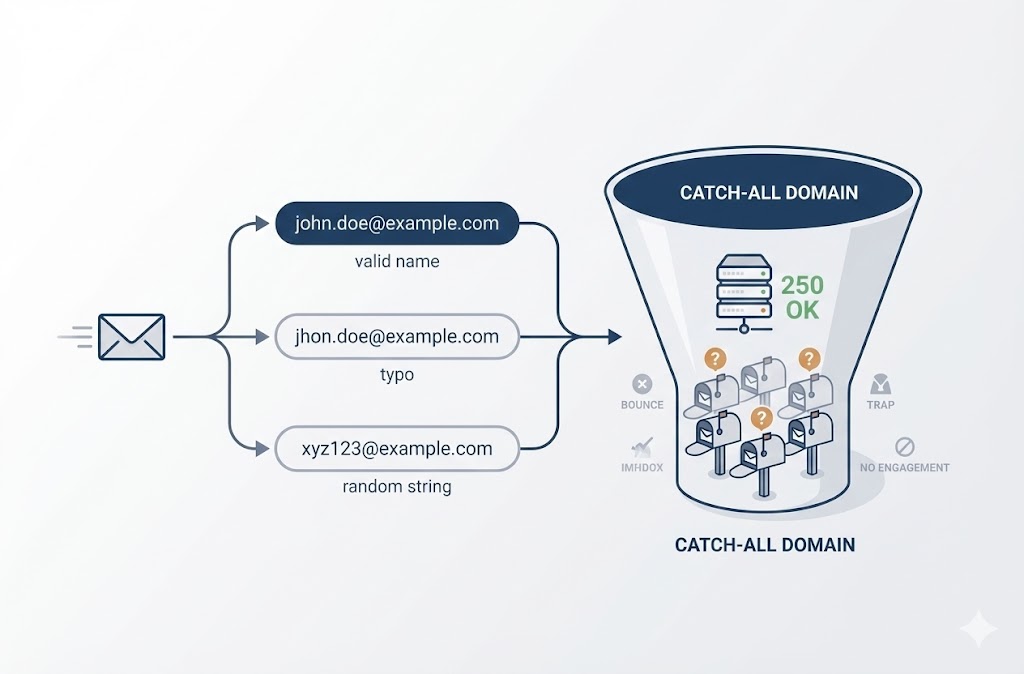
- Catch-all domains: Accept all emails regardless of username (can’t confirm specific address exists)
- Role-based addresses: Generic addresses like info@, support@, sales@ (often unmonitored, higher complaint risk)
- Disposable emails: Temporary addresses from services like Mailinator (will likely become invalid)
How to Test if an Email Will Bounce
You have three options for checking emails before sending:
Option 1: Single email verification
Test individual addresses one at a time. Useful for:
- Checking a specific address you’re unsure about
- Verifying VIP contacts before outreach
- Spot-checking list quality
BoltRoute offers single email verification directly in the browser—no signup required for your first test.
Option 2: Bulk list verification
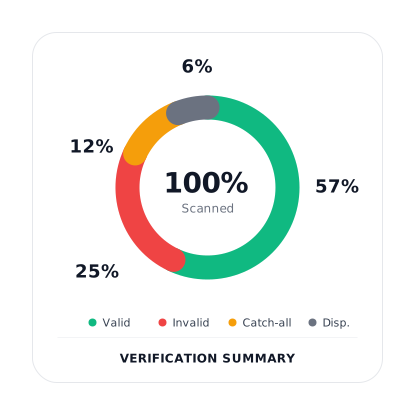
Upload your entire list as a CSV, Excel, or text file. The verification service checks every address and returns results categorized as:
- Valid: Safe to send
- Invalid: Remove immediately (would hard bounce)
- Risky: Catch-all, role-based, or disposable (send with caution)
This is the fastest way to clean an existing list before a campaign.
Option 3: API verification
Integrate verification directly into your signup forms, CRM, or automation workflows. Every new email gets verified in real-time before entering your list.
This prevents bad addresses from ever reaching your database—the most effective long-term approach.
When to Verify Your List
| Situation | Verification Approach |
|---|---|
| Before any campaign to a list you haven’t emailed in 6+ months | Full bulk verification |
| After importing contacts from a new source | Full bulk verification |
| Before cold outreach to prospects | Full bulk verification |
| Ongoing list maintenance | Quarterly bulk verification |
| New signups entering your database | Real-time API verification |
| Checking a single important contact | Single email verification |
What Verification Can’t Catch
Email verification prevents most hard bounces but not all delivery issues. Verification cannot predict:
- Future account deletion: A valid address today might be deleted tomorrow
- Soft bounces: Full inboxes and server outages are unpredictable
- Spam filtering: Content and reputation issues happen after delivery attempts
- Catch-all uncertainty: Some catch-all domains can’t be verified with 100% certainty
Verification dramatically reduces bounce risk—but it’s not a guarantee. Combine it with good list hygiene practices for best results.
How to Reduce Email Bounce Rate
Reducing email bounce rates requires both prevention strategies and ongoing list maintenance. You can’t eliminate bounces entirely—but you can keep them low enough to protect your sender reputation.
Here are seven proven methods to reduce bounce rates:
- Verify email addresses before sending Email verification catches invalid addresses before they bounce. Run your list through a verification service before every campaign—especially if you haven’t emailed those contacts recently. For ongoing protection, integrate verification into your signup forms via API. Bad addresses never enter your list in the first place.
- Use double opt-in for new signups Double opt-in requires subscribers to confirm their email address by clicking a link. This eliminates:
- Typos (user entered wrong address)
- Fake addresses (user didn’t want to give real email)
- Bot signups (automated spam entries) Single opt-in is faster for users but lets bad data into your list. Double opt-in adds friction but guarantees the address works.
- Remove hard bounces immediately Never send to a hard-bounced address twice. Most email service providers do this automatically, but verify your settings. Some platforms require manual removal. Create a suppression list of hard-bounced addresses. Check new imports against this list before adding them to active campaigns.
- Handle soft bounces after repeated failures Set a threshold: if an address soft bounces 3 times consecutively across different campaigns, remove it. The mailbox is likely abandoned. Check your ESP’s retry policy. Most platforms retry soft bounces automatically for 24–72 hours before marking them as failed.
- Clean your list regularly Email lists decay at roughly 2–3% per month. People change jobs, abandon accounts, and switch providers. An address that worked six months ago might be dead today. Recommended cleaning schedule:
- Monthly: Remove hard bounces and unsubscribes
- Quarterly: Run full list verification
- Before major campaigns: Verify any segment you haven’t emailed in 90+ days
- Authenticate your sending domain Proper email authentication prevents legitimate emails from being rejected as suspicious. Configure these DNS records:
- SPF: Specifies which servers can send email for your domain
- DKIM: Adds a cryptographic signature to verify message integrity
- DMARC: Tells receiving servers how to handle authentication failures Gmail, Yahoo, and Microsoft now require these for bulk senders. Missing authentication can cause blocks that look like bounces. (Gmail sender guidelines)
- Avoid purchased or rented email lists Purchased lists contain outdated addresses, spam traps, and people who never consented to your emails. Bounce rates on purchased lists frequently reach double digits—enough to destroy your sender reputation in one campaign. The same applies to scraped lists, third-party “lead databases,” and lists you haven’t personally built. If someone didn’t explicitly sign up to hear from you, the risk isn’t worth it.
Quick Action Checklist
| Action | Frequency | Impact on Bounces |
|---|---|---|
| Verify new signups via API | Real-time | Prevents hard bounces at source |
| Enable double opt-in | Ongoing | Eliminates typos and fake addresses |
| Remove hard bounces | After each campaign | Prevents repeat bounces |
| Remove chronic soft bounces | After 3 consecutive failures | Removes abandoned mailboxes |
| Run full list verification | Quarterly | Catches list decay |
| Configure SPF, DKIM, DMARC | Once (then maintain) | Prevents authentication-related rejections |
| Avoid purchased lists | Always | Avoids catastrophic bounce rates |
Frequently Asked Questions
Should I remove hard bounces from my email list?
Yes—immediately. Hard bounces indicate permanent delivery failures that will never resolve. Continuing to send to these addresses wastes resources and damages your sender reputation with every attempt. Most email service providers automatically suppress hard bounces. Verify this setting is enabled, and check that hard-bounced addresses aren’t accidentally re-imported when you upload new contacts.
What is an example of a hard bounce?
A common hard bounce example: you email john.smith@company.com, but John left the company six months ago. His email account was deleted. The mail server returns a 550 error (“User unknown”), and the message bounces permanently. Other examples include: Emailing a misspelled domain like @gmial.com (domain doesn’t exist) Sending to an address that was never real (fake signup) Getting blocked by a server that has blacklisted your domain
What is an example of a soft bounce?
A typical soft bounce example: you email sarah@example.com, but Sarah’s inbox is full because she’s on vacation and hasn’t deleted anything in two weeks. The server returns a 452 error (“Mailbox full”), and the message bounces temporarily. Other examples include: -Recipient’s mail server is down for maintenance -Your email attachment exceeds the server’s size limit -The server is temporarily throttling incoming messages
Why is my email hard bouncing?
Your email hard bounces when the recipient address has a permanent problem. The most common causes: The address doesn’t exist — Typo, fake signup, or deleted account The domain doesn’t exist — Misspelled or expired domain Your sending domain is blocked — Blacklisted IP or domain Missing authentication — No SPF, DKIM, or DMARC configured Check your bounce report for the specific error code. A 550 error usually means the address is invalid. A 551 or 553 might indicate a block or policy rejection.
How do soft bounces affect email marketing campaigns?
Soft bounces have minimal impact if they’re occasional and addressed properly. A few soft bounces per campaign are normal—you can’t control when recipient servers have issues. Soft bounces become a problem when: The same addresses soft bounce repeatedly (abandoned mailboxes) Your overall soft bounce rate exceeds 1.5% You ignore them and let them accumulate Treat addresses that soft bounce 3+ times consecutively as hard bounces and remove them.
Can a soft bounce become a hard bounce?
Yes. A soft bounce can convert to a hard bounce under two circumstances: The underlying issue becomes permanent. A “mailbox full” soft bounce becomes a hard bounce if the account gets deleted for inactivity. Your ESP reclassifies it. Most email service providers automatically convert addresses to hard bounces after multiple consecutive soft bounce failures (typically 3–7 attempts over 24–72 hours). This is why monitoring soft bounces matters. An address that soft bounces every campaign is effectively dead.
What’s the difference between bounce rate and spam complaint rate?
Bounce rate measures emails that never reached the recipient server. Spam complaint rate measures emails that arrived but were manually marked as spam by recipients. +———————+——————————————-+—————————————-+ | Metric | What It Measures | Target | +———————+——————————————-+—————————————-+ | Bounce rate | Delivery failures (hard + soft) | Under 2% | | Spam complaint rate | Recipients clicking “Mark as spam” | Under 0.1% (Gmail requires under 0.3%) | +———————+——————————————-+—————————————-+ Both metrics affect sender reputation, but they indicate different problems. High bounces mean list quality issues. High complaints mean content or consent issues.
How long should I wait before removing a soft-bounced address?
Wait for 2–3 delivery attempts across different campaigns before removing a soft-bounced address. Most ESPs retry automatically within 24–72 hours of the initial soft bounce. If an address soft bounces on three separate campaigns (not just three retries within one campaign), remove it. At that point, the mailbox is likely abandoned or permanently over capacity.
Does email verification guarantee zero bounces?
No. Email verification significantly reduces hard bounces but cannot eliminate them entirely. Verification cannot predict: Accounts deleted after verification but before sending Temporary server issues (soft bounces) Catch-all domains that accept everything during verification but reject later Verification typically reduces hard bounce rates significantly—but some bounces are unavoidable. The goal is keeping your bounce rate low enough to protect sender reputation, not achieving perfection.