What Is Email Verification? A Complete Guide for Beginners (2026)
11 January 2026
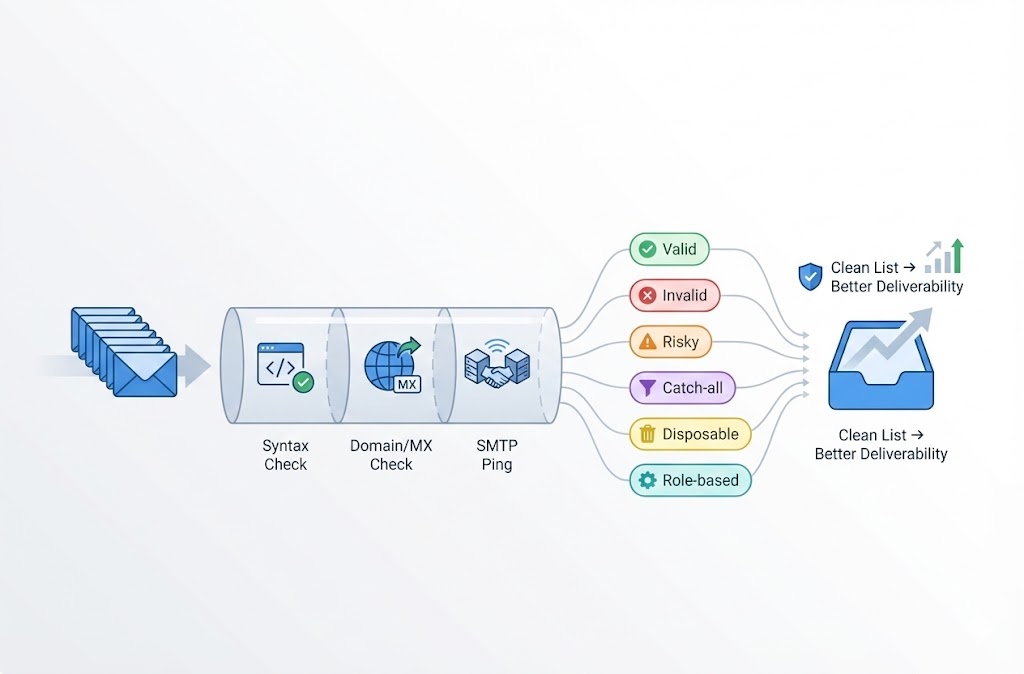
Email verification is the process of checking whether an email address is real, properly formatted, and capable of receiving messages. Before you send a campaign or cold outreach, verification identifies invalid, fake, or risky addresses on your list — so you don’t waste sends on emails that will bounce.
Table of Contents
- What Does Email Verification Mean?
- Email Verification vs Email Authentication — Not the Same Thing
- How Does Email Verification Work?
- What Is Email Validation vs Email Verification?
- Why Email Verification Is Important
- What Happens If You Don’t Verify Emails
- What Is an Email Verification Service?
- How to Verify Your Email List (Practical Steps)
- Email Verification Best Practices
- Compliance Considerations
- Frequently Asked Questions
- Is email verification necessary?
- How much does email verification cost?
- What’s the difference between email verification and email validation?
- How long does email verification take?
- Can I verify emails for free?
- How accurate is email verification?
- What is a catch-all email address?
- Should I delete all non-Valid addresses?
- How often should I verify my email list?
Key Takeaways:
- Email verification checks if an address exists and can receive mail (not the same as user signup confirmation)
- The process includes syntax checks, domain validation, and mailbox-level SMTP pings
- Skipping verification leads to high bounce rates, damaged sender reputation, and wasted budget
- Most verification services charge $1–$10 per 1,000 emails; free tiers exist
- Anyone sending bulk email — marketers, sales teams, agencies — needs this
A clean list means fewer bounces, better deliverability, and more emails actually reaching inboxes. This guide explains exactly how email verification works, why it matters, and how to do it right.
What Does Email Verification Mean?
Email verification means confirming that an email address on your list is valid and deliverable before you send to it. The goal is simple: remove bad addresses so your emails reach real inboxes instead of bouncing.
When you verify an email, you’re answering three questions:
- Is the format correct? (Does it follow the
name@domain.comstructure?) - Does the domain exist? (Is
domain.coma real, active domain with mail servers?) - Does the mailbox exist? (Will
name@domain.comactually accept a message?)
Verification tools run these checks automatically — without sending an actual email. The result tells you whether the address is safe to send to, risky, or completely invalid.
You might also hear this called email validation. The terms mean the same thing. Some people use “validation” for syntax-only checks and “verification” for the full process including mailbox pings, but in practice, the industry uses both words interchangeably.
One clarification: this article covers list verification — checking addresses you’ve collected for outreach or marketing. It’s not about the confirmation email a user receives when signing up for your app (that’s a different process called double opt-in or account verification). We’ll clear up this confusion in the next section.
Email Verification vs Email Authentication — Not the Same Thing
Search results for “email verification” mix two completely different concepts. If you’re confused, you’re not alone. Let’s clear this up.
Email verification checks whether recipient addresses on your list are valid and deliverable. It’s about cleaning your contact list before sending.
Email authentication proves that you (the sender) are authorized to send from your domain. It’s about configuring DNS records so inbox providers trust your emails.
| Aspect | Email Verification | Email Authentication |
|---|---|---|
| What it checks | Recipient email addresses | Your sending domain/identity |
| Purpose | Remove invalid/risky addresses from your list | Prove to ISPs you’re a legitimate sender |
| How it works | Syntax check, domain lookup, SMTP ping | SPF, DKIM, DMARC records in DNS |
| When you do it | Before campaigns or on lead import | Once during domain setup (then monitor) |
| Tools involved | Email verification services | DNS settings, postmaster tools |
| Outcome | Fewer bounces, cleaner list | Better inbox placement, avoid spam folder |
Both matter for deliverability, but they solve different problems. Email verification cleans your list. Email authentication proves your identity. You need both if you’re sending at scale.
This guide focuses on email verification — the process of validating recipient addresses. If you’re looking for SPF/DKIM/DMARC setup guides, that’s email authentication (a topic for another article).
How Does Email Verification Work?
Email verification runs a series of automated checks against each address without sending an actual email. The process takes seconds per address and typically follows five steps.
- Syntax Check
The tool checks if the address follows valid email formatting rules. Does it have an @ symbol? Is the structure
localpart@domain.tld? Addresses likejohn@@companyormissing-at-sign.comfail immediately. - Domain Check
The tool confirms the domain exists and is active. If someone entered
john@gmial.com(typo) orjane@fakecorp.xyz(non-existent), this step catches it. - MX Record Lookup MX (Mail Exchange) records tell the internet which servers handle email for a domain. The tool queries DNS to confirm MX records exist. No MX records = the domain can’t receive email.
- SMTP Handshake (Mailbox Ping) The tool connects to the mail server and asks: “Does this specific mailbox exist?” It simulates the start of sending an email without actually delivering anything. The server responds with accept, reject, or unknown.
- Risk Classification
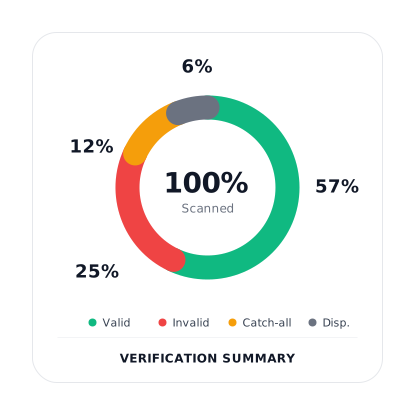
Based on all checks, the address gets categorized. Common classifications include:
- Valid — Safe to send
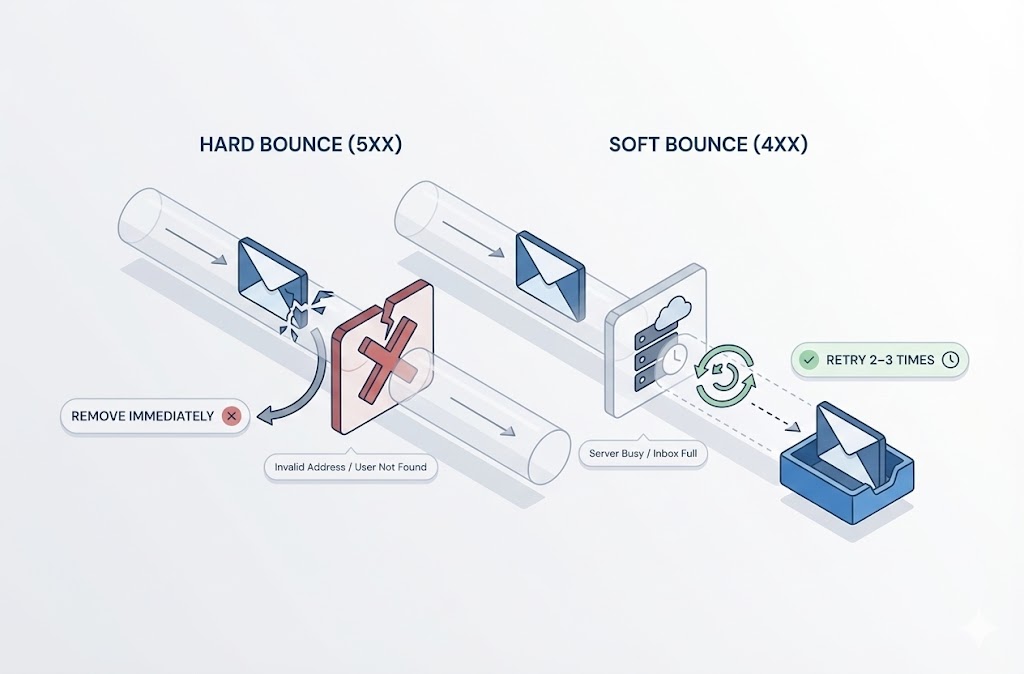
- Invalid — Doesn’t exist, will hard bounce
- Risky — May bounce or cause issues
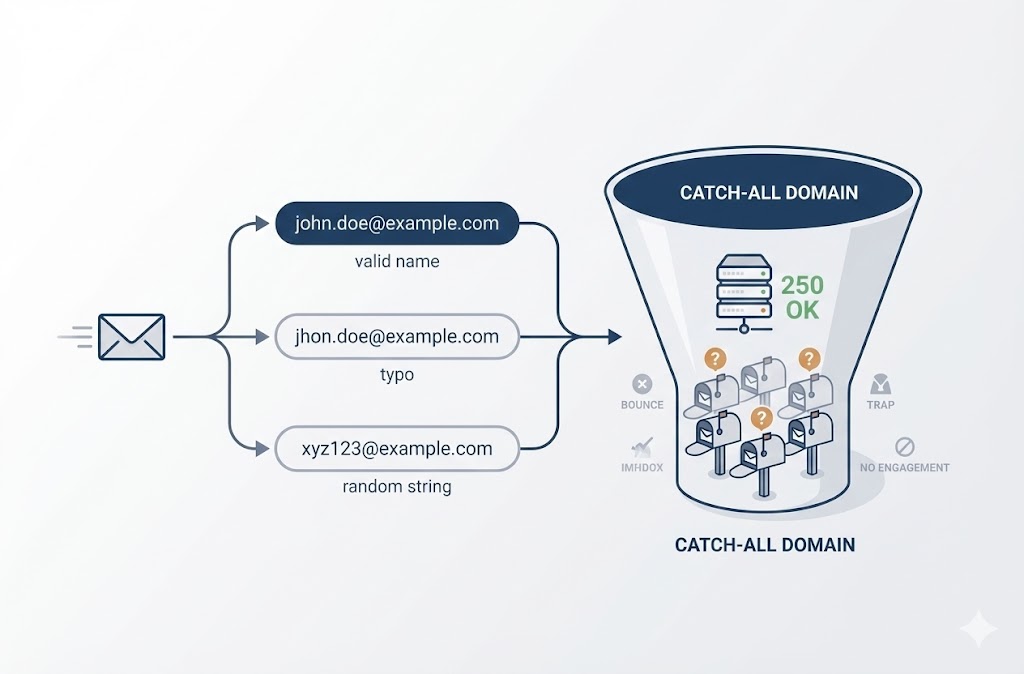
- Catch-all — Domain accepts all addresses (can’t confirm specific mailbox)
- Disposable — Temporary email service (Mailinator, Guerrilla Mail, etc.)
- Role-based — Generic address like info@, support@, sales@
The entire process happens without the recipient knowing. No email lands in their inbox. The verification service pings mail servers directly to determine deliverability.
Why does SMTP handshake matter? Syntax and domain checks only confirm the domain is real. The SMTP handshake confirms the specific mailbox exists. Someone could type validname@realdomain.com where the domain is fine but validname was never created — only the mailbox ping catches that.
What Is Email Validation vs Email Verification?
Email validation is the same process as email verification. The industry uses both terms interchangeably, and you’ll see vendors mix them freely in marketing copy.
If there’s any distinction, it’s minor:
- Validation sometimes refers to lightweight checks — syntax and domain only
- Verification sometimes implies the full process including SMTP mailbox pings
But in practice, most tools labeled “email validator” or “email verifier” do the same thing: run all five steps (syntax, domain, MX, SMTP, classification) and return a deliverability verdict.
What is an email validation checker? It’s simply a tool that performs email verification. Whether the product page says “validator,” “verifier,” or “checker,” you’re getting the same core functionality. The name depends on the vendor’s marketing preference, not a technical difference.
Don’t overthink the terminology. When evaluating tools, look at what checks they actually perform:
- Does it do SMTP-level mailbox verification? (Not just syntax)
- Does it detect catch-all domains?
- Does it flag disposable and role-based addresses?
- Does it offer bulk processing and API access?
These capabilities matter more than whether the tool calls itself a “validator” or “verifier.”
Why Email Verification Is Important
Email verification protects your sender reputation and campaign performance. Without it, you’re sending blind — hoping addresses are valid instead of knowing they are.
Here’s why verification matters:
1. Lower Bounce Rates
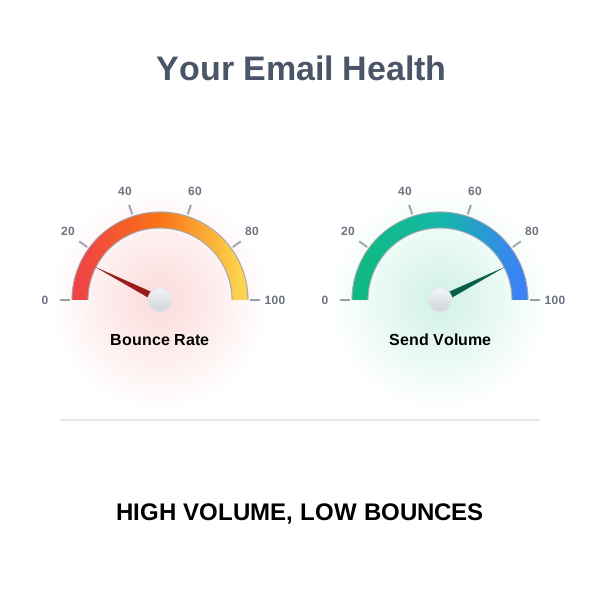
Hard bounces happen when you send to addresses that don’t exist. ISPs track your bounce rate. Exceed their threshold (often around 2%), and they start throttling or blocking your emails. Verification removes invalid addresses before you hit send, keeping bounces near zero.
2. Protect Sender Reputation
Your sender reputation is a score ISPs assign based on your sending behavior. High bounces, spam complaints, and sending to spam traps damage it. Once your reputation tanks, even emails to valid addresses land in spam. Reputation takes months to build and days to destroy. Verification is preventive maintenance.
3. Reduce Wasted Email Spend
Most ESPs charge by volume — per email sent or per contact stored. Sending to invalid addresses burns budget on messages that will never arrive. If 10% of your list is invalid, you’re wasting 10% of your email spend. Verification pays for itself by trimming dead weight.
4. Improve Deliverability Metrics
Deliverability isn’t just “did it send?” — it’s “did it reach the inbox?” Clean lists produce better open rates, click rates, and engagement signals. ISPs notice. Higher engagement tells Gmail, Yahoo, and Outlook that recipients want your emails, which improves future inbox placement.
Is email verification necessary? If you’re sending one-off emails to people you know, probably not. If you’re sending bulk campaigns, cold outreach, or newsletters to lists you’ve built over time — yes. The risk of not verifying scales with volume. A 5% bounce rate on 100 emails is annoying. A 5% bounce rate on 100,000 emails can get your domain blacklisted.
What Happens If You Don’t Verify Emails
Skipping verification creates compounding problems that get worse with every campaign. The damage isn’t always immediate, which is why many senders don’t realize they have a list hygiene problem until it’s too late.
Bounced Emails Pile Up
Every invalid address means a hard bounce. ISPs log these. One bad campaign with a 5–10% bounce rate raises red flags. Do it repeatedly, and you’re training inbox providers to distrust your domain. The bounces don’t disappear — they accumulate in your sender history.
Sender Reputation Tanks
Gmail, Yahoo, and Outlook assign reputation scores to sending domains and IPs. High bounce rates, spam trap hits, and low engagement drag that score down. Once your reputation drops, even legitimate emails to valid subscribers start landing in spam. Recovery takes weeks or months of careful sending — if you can recover at all.
Your ESP May Suspend Your Account
Email service providers don’t want their shared infrastructure blacklisted because of your dirty list. Most ESPs monitor bounce rates and will warn you, throttle your sends, or outright suspend your account if you exceed their limits. Some enforce hard caps at 2–3% bounce rates.
Wasted Budget on Undeliverable Sends
You pay for every email sent — whether it arrives or not. Invalid addresses consume credits, inflate contact storage costs, and skew your cost-per-acquisition metrics. For high-volume senders, the waste adds up fast.
Inaccurate Campaign Data
If 8% of your list is invalid, your open rates and click rates are artificially deflated. You’re measuring performance against a denominator that includes addresses that never had a chance of engaging. Dirty data leads to bad decisions — you might kill a campaign that’s actually performing well, or double down on one that isn’t.
Spam Trap Exposure
Old, abandoned addresses sometimes get recycled as spam traps by ISPs and blacklist operators. If you’re not cleaning your list, you’re eventually going to hit one. A single spam trap hit can land your domain on a blacklist, tanking deliverability overnight.
The fix is straightforward: verify before you send. The cost of verification is trivial compared to the cost of domain reputation damage or ESP suspension.
What Is an Email Verification Service?
An email verification service is a tool that automates the entire verification process — syntax checks, domain validation, MX lookups, SMTP pings, and risk classification — so you don’t have to do it manually.
You upload a list (or connect via API), the service runs checks against every address, and you get back results showing which emails are safe to send, which are invalid, and which are risky.
What Verification Services Typically Offer
- Bulk file verification — Upload CSV, Excel, or text files containing thousands or millions of addresses. Download cleaned results when processing completes.
- Single email testing — Check individual addresses in-browser for quick lookups.
- API access — Integrate verification into your app, CRM, or signup forms. Verify addresses programmatically in real-time.
- Workflow integrations — Connect to tools like Zapier, n8n, or Google Sheets to verify emails without leaving your existing workflow.
- Dashboard and reporting — View verification history, risk distribution, and diagnostics for past jobs.
What the Verification Output Includes
After verification, each address gets a classification. Standard categories include:
| Classification | What It Means | Recommended Action |
|---|---|---|
| Valid | Address exists and can receive email | Safe to send |
| Invalid | Address doesn’t exist or will hard bounce | Remove from list |
| Risky | May bounce or cause deliverability issues | Send with caution or exclude |
| Catch-all | Domain accepts all addresses; specific mailbox unverifiable | Segment separately; test small batches |
| Disposable | Temporary email service (Mailinator, Guerrilla Mail, etc.) | Remove — low engagement, often fake signups |
| Role-based | Generic address like info@, support@, admin@ | Remove or handle carefully — often shared inboxes with low engagement |
Good services also provide diagnostics like SMTP response codes, domain health status, and risk scores — giving you the context to make decisions beyond simple pass/fail.
What to Look for in a Verification Service
Not all tools are equal. When evaluating options, consider:
- Accuracy — Does it catch invalid addresses reliably? Does it handle catch-all domains intelligently?
- Speed and throughput — Can it process your list size in reasonable time?
- Pricing model — Per-verification credits? Monthly subscription? Do credits expire?
- Integration options — API, webhooks, native integrations with your existing tools?
- Data handling — What happens to your data after verification? Look for services that don’t retain your lists.
BoltRoute, for example, offers bulk file verification (CSV/Excel/text uploads), a REST API with webhooks, and workflow integrations with tools like Zapier, n8n, and Google Sheets. You can test a single email instantly in-browser with no signup required, and new users get 100 free verifications without a credit card.
How to Verify Your Email List (Practical Steps)
Email list verification follows a straightforward process that takes minutes for small lists and a few hours for large ones. Here’s how to do it from start to finish.
- Export Your List from Your ESP or CRM Go to your email platform (Mailchimp, HubSpot, Klaviyo, Salesforce, etc.) and export your contacts as a CSV or Excel file. Make sure the export includes the email address column. You don’t need other fields for verification, but most tools preserve them in the output.
- Choose a Verification Service Pick a tool that fits your volume and workflow. If you need a one-time bulk clean, file upload is enough. If you want ongoing verification as leads come in, look for API access or integrations with your existing tools.
- Upload Your File Most services accept CSV, Excel (.xlsx), or plain text files. Drag and drop or browse to upload. The tool will detect the email column automatically or ask you to map it.
- Run Verification Start the job. Processing speed varies by service and list size. Expect roughly 1,000–10,000 verifications per minute for bulk jobs. Larger lists may take an hour or more. Most tools let you close the browser and return when processing completes.
- Download Cleaned Results When verification finishes, download the results file. It will contain your original data plus new columns showing each address’s classification (Valid, Invalid, Risky, Catch-all, Disposable, Role-based) and often additional diagnostics.
- Remove or Segment Problem Addresses At minimum, delete all Invalid addresses — these will hard bounce. For Risky, Disposable, and Role-based addresses, either remove them or move them to a separate segment you don’t include in regular campaigns. Catch-all addresses require judgment: you can’t confirm they’re valid, but they won’t necessarily bounce.
- Re-import Your Clean List Upload the cleaned file back to your ESP or CRM. Replace the old list or create a new segment. Some platforms let you tag contacts by verification status so you can filter them later.
For Ongoing Verification
Bulk cleaning handles your existing list, but new leads keep coming in. To maintain list hygiene over time:
- Verify at point of entry — Use API or form integrations to check addresses as people sign up. Reject or flag invalid emails before they enter your database.
- Schedule regular audits — Re-verify your list monthly or quarterly, especially if you have low engagement segments that haven’t been mailed recently.
- Monitor bounce rates after sends — If bounces spike, you have a data quality problem upstream. Investigate where bad addresses are entering your funnel.
BoltRoute supports both workflows: drag-and-drop bulk file uploads for one-time cleans, and API/webhook integrations for real-time verification inside your existing tools.
Email Verification Best Practices
Email verification works best as an ongoing discipline, not a one-time cleanup. Lists decay over time — people change jobs, abandon inboxes, and typo their addresses at signup. Build verification into your workflow with these practices.
Validate at Point of Entry
Don’t wait until you have a dirty list. Catch bad addresses before they enter your database. Add real-time verification to signup forms, lead capture pages, and checkout flows. When someone enters an invalid or disposable email, prompt them to correct it immediately. This keeps your list clean from day one.
Use Double Opt-In for Marketing Lists
Double opt-in requires new subscribers to click a confirmation link before being added to your list. It’s an extra step that filters out typos, fake signups, and bots. People who complete double opt-in have proven their address works and they actually want your emails. The result: higher engagement rates and fewer complaints.
Clean Your List Regularly
Email addresses decay at roughly 20–30% per year. People leave companies, switch providers, and let inboxes go dormant. A list you verified six months ago has already degraded. Schedule bulk verification monthly or quarterly — especially before major campaigns. If you have segments you haven’t mailed in a while, verify those before re-engaging.
Monitor Bounce Rates After Every Send
Verification catches most problems upfront, but it’s not perfect. Catch-all domains can’t be fully verified. Inboxes get deleted between verification and send. Track your bounce rate after every campaign. If it spikes above 1–2%, investigate. Find out where bad addresses are entering your funnel and fix the leak.
Segment Risky Addresses Instead of Deleting Blindly
Not every non-Valid address is worthless. Catch-all addresses might be perfectly deliverable — you just can’t confirm it. Role-based addresses (info@, sales@) might be monitored by real people. Instead of mass-deleting everything that isn’t Valid, create segments:
- Safe to send — Valid addresses
- Proceed with caution — Catch-all, role-based
- Do not send — Invalid, disposable
Test risky segments in small batches. Monitor results. Adjust your rules based on actual performance, not assumptions.
Remove Repeat Bouncers Permanently
If an address hard bounces once, it will bounce again. Most ESPs automatically suppress hard bounces, but check that this is actually happening. Maintain a suppression list of addresses that have bounced across campaigns. Never re-add them without re-verification.
Compliance Considerations
Email verification isn’t a legal requirement under privacy laws. But it supports compliance by reducing the behaviors that trigger complaints and regulatory scrutiny.
How Verification Helps with Compliance
Laws like GDPR (Europe), CAN-SPAM (United States), and CASL (Canada) regulate how you collect, store, and send email. While none of them mandate list verification specifically, they do require:
- Sending only to people who consented (or have a legitimate relationship with you)
- Honoring unsubscribe requests promptly
- Not engaging in deceptive sending practices
Verification helps indirectly. A clean list means you’re not emailing abandoned addresses whose owners can’t unsubscribe because they no longer access that inbox. It reduces spam complaints from recipients who don’t recognize you — because you’re reaching people who actually signed up, not outdated contacts from a purchased list that’s been resold a dozen times.
Avoiding Spam Traps
Spam traps are email addresses operated by ISPs and blacklist providers to catch senders with poor list hygiene. Some are recycled addresses — old inboxes that were abandoned and later repurposed as traps. Others are pristine traps that were never real addresses and should never appear on a legitimate list.
Hitting spam traps can result in blacklisting and potential compliance investigations. Verification helps by flagging invalid and risky addresses, reducing the chance that traps slip through.
Data Handling Matters
When you upload a list to a verification service, you’re sharing personal data with a third party. Under GDPR and similar laws, you need to ensure that third party handles data appropriately. Look for verification services that:
- Don’t retain your email lists after processing
- Offer encryption in transit and at rest
- Have clear privacy policies explaining their data practices
This is a vendor selection issue, not a verification issue — but it matters for your overall compliance posture.
Verification Supports Good Practices, Not a Checkbox
Compliance is about demonstrating responsible sending behavior. Clean lists, low complaint rates, proper consent records, and easy unsubscribes all contribute. Verification won’t make you compliant on its own, but it removes one common source of problems: sending to addresses that shouldn’t be on your list in the first place.
Frequently Asked Questions
Is email verification necessary?
Yes — if you’re sending email at scale. For personal emails or small transactional sends, verification is overkill. But for marketing campaigns, cold outreach, and newsletters, verification prevents bounces that damage your sender reputation. The larger your list and the more frequently you send, the more necessary verification becomes.
How much does email verification cost?
Most services charge per verification, typically ranging from $1 to $10 per 1,000 emails depending on volume tiers. Some offer monthly subscriptions with bundled credits. Many providers include free trials — BoltRoute, for example, offers 100 free verifications with no credit card required. At scale, verification costs pennies per address and pays for itself by reducing wasted sends and protecting your domain reputation.
What’s the difference between email verification and email validation?
They’re the same thing. The industry uses both terms interchangeably. Some vendors use “validation” to describe syntax-only checks and “verification” for full SMTP-level testing, but in practice, most tools perform all steps regardless of what they call themselves. Don’t get hung up on terminology — focus on what checks the tool actually performs.
How long does email verification take?
Single email verification is instant — results return in under a second. Bulk verification depends on list size and the service’s processing speed. Most tools verify 1,000 to 10,000 addresses per minute. A 50,000-address list typically takes 5–50 minutes. Very large lists (millions of addresses) may take several hours. Most services process jobs in the background, so you can close your browser and return when it’s done.
Can I verify emails for free?
Yes — most verification services offer free tiers or trial credits. BoltRoute provides 100 free verifications with no signup required for the first test. Free tiers are useful for testing a service before committing, but ongoing verification at scale requires a paid plan. If you’re evaluating tools, use free credits to compare accuracy and speed across providers.
How accurate is email verification?
Accuracy varies by provider and address type. For standard addresses, good services achieve high accuracy on identifying valid versus invalid emails. Catch-all domains are the main limitation — these domains accept all incoming mail, so verification can’t confirm whether a specific mailbox exists. Reputable services will classify catch-all addresses separately rather than guessing.
What is a catch-all email address?
A catch-all (or accept-all) domain is configured to accept email sent to any address at that domain, whether the mailbox exists or not. For example, if company.com is catch-all, both realemployee@company.com and randomtypo@company.com will be accepted by the mail server. Verification can confirm the domain is catch-all but can’t verify the specific mailbox. Handle catch-all addresses carefully — test in small batches and monitor bounce rates.
Should I delete all non-Valid addresses?
Not necessarily. Invalid addresses should always be removed — they’ll hard bounce. But other categories require judgment: Catch-all — May be deliverable; segment and test Role-based (info@, support@) — Often lower engagement but not necessarily invalid; consider your use case Disposable — Usually safe to remove; these are temporary addresses unlikely to engage Risky — Evaluate case by case based on the specific risk flags Create segments by risk level and make decisions based on your tolerance and campaign goals.
How often should I verify my email list?
Verify before every major campaign if your list hasn’t been cleaned recently. For ongoing maintenance, monthly or quarterly verification is a reasonable cadence. Lists decay at roughly 20–30% per year, so a list you cleaned six months ago has likely degraded. If you have segments you haven’t emailed in a while, always verify before re-engaging — dormant addresses are the highest risk for bounces and spam traps.