What Is a Cold Email? The Complete 2026 Guide for Beginners
10 January 2026
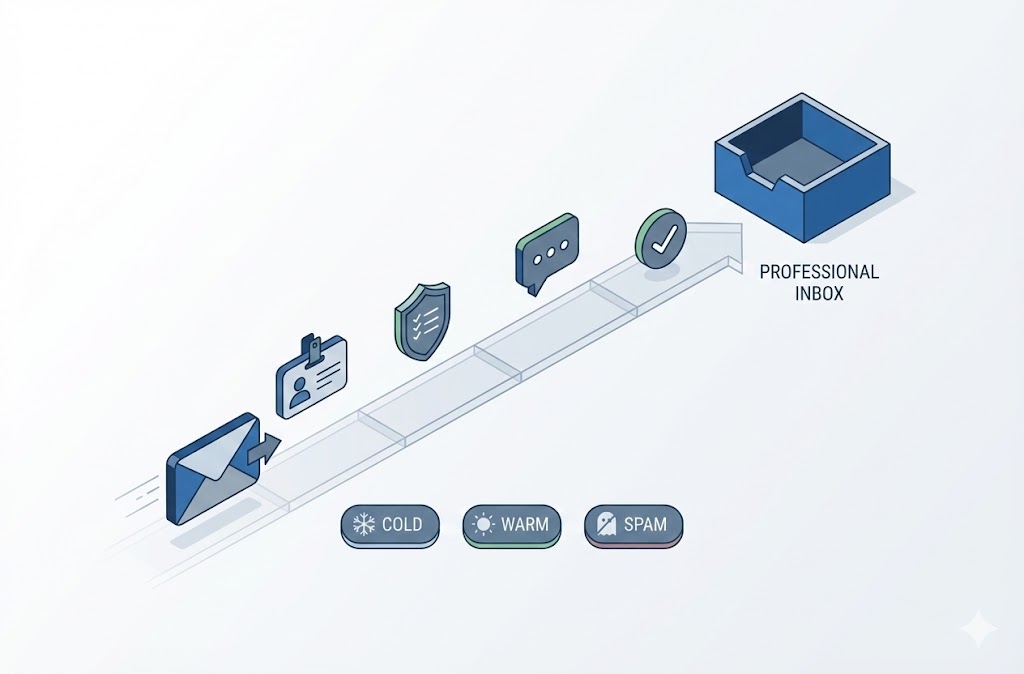
A cold email is an unsolicited email sent to someone you have no prior relationship with. Sales teams use cold emails to generate leads. Job seekers use them to land interviews. Researchers use them to connect with professors. Unlike spam, a cold email is personalized, relevant, and offers value to the recipient.
Table of Contents
- What Is a Cold Email?
- Cold Email vs. Email Marketing vs. Spam
- Cold Email vs. Warm Email
- Benefits of Cold Emailing
- Is Cold Email Legal?
- Anatomy of a Cold Email
- How to Write a Cold Email (Step-by-Step)
- How Long Should a Cold Email Be?
- How to Start a Cold Email
- How to End a Cold Email
- How to Follow Up on a Cold Email
- Cold Email Templates by Use Case
- Cold Email Examples (Good vs. Bad)
- Cold Email Metrics: What’s a Good Response?
- When Is the Best Time to Send a Cold Email?
- Advanced: Managing Your Cold Email List
- Frequently Asked Questions
- What is a cold email?
- Is cold emailing illegal?
- What is the difference between a cold email and a warm email?
- How long should a cold email be?
- What is a good reply rate for cold email?
- What is a good open rate for cold email?
- How do I follow up on a cold email?
- What is a good subject line for a cold email?
- How do I improve cold email response rates?
- Why is email verification important for cold email?
Key Takeaways:
- A cold email targets someone who hasn’t opted in to hear from you
- Cold emailing is legal when you follow CAN-SPAM and GDPR rules
- The best cold emails are short, personalized, and have one clear ask
- Average reply rates range from 1–10% depending on targeting and copy quality
- Email verification before sending protects your sender reputation and reduces bounces
This guide covers everything from writing your first cold email to advanced list management—whether you’re cold emailing for a job, internship, sales, research, or networking.
What Is a Cold Email?
A cold email is an outreach message sent to a recipient who has no existing relationship with the sender. The recipient has not subscribed to your list, requested information, or interacted with your brand before.
Cold email marketing refers to using cold emails as a systematic strategy to generate leads, book meetings, or build business relationships. Sales development teams, recruiters, founders, and freelancers rely on cold email as a primary outreach channel.
What does cold email mean in practice? It means:
- No prior contact — the recipient doesn’t know you
- Targeted intent — you’ve selected this person for a specific reason
- Value exchange — you’re offering something relevant, not just asking
Cold emails serve multiple purposes:
| Use Case | Goal | Example Sender |
|---|---|---|
| Sales prospecting | Book a demo or call | SDR, account executive |
| Job hunting | Get an interview or referral | Job seeker, career changer |
| Internship outreach | Secure an internship offer | Student, recent graduate |
| Research opportunities | Join a lab or project | Undergraduate, grad student |
| Networking | Build professional relationships | Entrepreneur, freelancer |
| Link building / PR | Earn media coverage or backlinks | Marketer, founder |
The defining feature of cold email is the absence of prior permission. This is what separates it from email marketing (where recipients opted in) and what makes compliance, personalization, and relevance critical to success.
Cold Email vs. Email Marketing vs. Spam
Cold email differs from email marketing and spam in three ways: permission, audience relationship, and intent. Understanding these distinctions matters because it affects your legal obligations, deliverability, and response rates.
Email marketing targets people who opted in—subscribers who signed up for your newsletter, downloaded a lead magnet, or created an account. You have explicit permission to contact them.
Cold email targets people who haven’t opted in but match your ideal customer or contact profile. You don’t have permission, but you have a legitimate reason to reach out. The email is personalized and relevant to the recipient.
Spam is unsolicited bulk email sent without regard for relevance or recipient interest. Spam ignores personalization, blasts thousands of addresses, and typically violates anti-spam laws.
| Factor | Cold Email | Email Marketing | Spam |
|---|---|---|---|
| Prior permission | No | Yes (opt-in) | No |
| Recipient relationship | None (yet) | Existing subscriber/customer | None |
| Personalization | High (individualized) | Medium (segmented) | None or fake |
| Relevance to recipient | Targeted and specific | Based on interests/behavior | Irrelevant |
| Volume per send | Low to medium | Medium to high | Very high (bulk) |
| Legal status (US) | Legal with compliance | Legal with compliance | Illegal under CAN-SPAM |
| Typical sender | SDR, job seeker, founder | Marketing team | Scammer, bad actor |
| Goal | Start a conversation | Nurture or convert | Deceive or defraud |
Why cold email is not spam:
- Intent — Cold email aims to start a genuine business conversation. Spam aims to deceive or exploit.
- Targeting — Cold email goes to a curated list of relevant recipients. Spam goes to purchased or scraped lists with no filtering.
- Compliance — Cold email includes accurate sender info, physical address, and opt-out mechanism. Spam hides or fakes these details.
- Volume — Cold email sends are measured (tens to hundreds per day). Spam blasts thousands or millions.
The line between cold email and spam comes down to relevance and respect. A cold email that offers no value, uses a misleading subject line, or ignores unsubscribe requests crosses into spam territory—legally and practically.
Cold Email vs. Warm Email
A cold email targets someone who has never interacted with you before. A warm email targets someone who already knows you exist—through a referral, previous conversation, social media interaction, or content engagement.
The difference matters because warm emails convert at significantly higher rates. When a recipient recognizes your name or has context for why you’re reaching out, they’re more likely to open, read, and reply.
Cold email scenario: You find a VP of Sales on LinkedIn. You’ve never met. You send an email introducing yourself and your offer.
Warm email scenario: That same VP commented on your LinkedIn post last week. You replied. Now you send a follow-up email referencing that exchange.
| Factor | Cold Email | Warm Email |
|---|---|---|
| Prior interaction | None | Yes (referral, social touch, event, content) |
| Recipient recognition | Doesn’t know you | May recognize your name |
| Trust level | Zero — must be earned | Some baseline trust exists |
| Personalization requirement | High (critical for response) | Medium (context already exists) |
| Typical reply rate | 1–10% | 15–40%+ |
| Best use case | Net-new outreach at scale | Following up on existing signals |
Ways to “warm up” a cold email:
- Engage on social first — Like, comment, or share their content on LinkedIn or Twitter before emailing
- Get a referral — Ask a mutual connection to introduce you or mention your name
- Reference shared context — Mention a conference you both attended, a podcast they appeared on, or an article they wrote
- Use trigger events — Reach out after a funding round, job change, or company news that makes your email timely
Many successful outreach strategies combine both. You might start with social engagement (warming) and then send an email (still cold, but warmer than a fully blind send). The goal is to reduce the “who is this person?” friction before your email lands.
Benefits of Cold Emailing
Cold email provides direct access to decision-makers without gatekeepers or ad spend. When executed correctly, it remains one of the most cost-effective channels for generating leads, landing jobs, and building professional relationships.
Why cold email works:
- Direct access — Your message lands in a decision-maker’s inbox. No algorithm, no ad auction, no gatekeeper filtering you out. A well-crafted cold email reaches the CEO the same way it reaches an intern.
- Scalability — You can send 50 personalized cold emails per day from a single inbox. With proper infrastructure (multiple domains, warm-up, rotation), sales teams scale to hundreds or thousands daily. Compare this to cold calling, which maxes out at ~50–80 dials per rep per day.
- Cost efficiency — Cold email requires minimal upfront investment. No ad budget. No booth at a conference. Just research, writing, and a verified email list. For startups and job seekers, this levels the playing field against bigger players with larger budgets.
- Lead generation — Cold email generates qualified leads by targeting specific companies, roles, and personas. You control who enters your pipeline rather than waiting for inbound. This is why SDR teams at B2B companies rely on cold outreach as a primary channel.
- Measurability — Every metric is trackable: open rate, reply rate, bounce rate, click rate. You can A/B test subject lines, body copy, and CTAs with precision. This feedback loop allows continuous improvement.
- Flexibility across use cases — The same fundamentals apply whether you’re cold emailing for sales, a job, an internship, research opportunities, or networking. The principles (personalization, relevance, clear ask) are universal.
- Speed to results — You can launch a cold email campaign in a day. Write the copy, build the list, verify the addresses, and send. Results (replies, meetings, opportunities) can arrive within hours. Paid ads and SEO take weeks or months to generate comparable outcomes.
The tradeoff: Cold email requires upfront effort in research, list building, and copywriting. Low-quality cold emails damage your sender reputation and burn your domain. The channel rewards precision—targeting the right people with the right message—and punishes lazy execution.
Is Cold Email Legal?
Cold email is legal in the United States, European Union, and most other jurisdictions when you follow applicable regulations. The key laws are CAN-SPAM (US), GDPR (EU), and CASL (Canada). Compliance isn’t complicated, but violations carry significant penalties. (Source)
United States: CAN-SPAM Act
The CAN-SPAM Act regulates commercial email in the US. It does not require prior consent—meaning cold email is explicitly permitted—but it mandates specific requirements:
- No deceptive headers — Your “From,” “To,” and “Reply-To” must be accurate
- No misleading subject lines — The subject must reflect the email content
- Identify as an advertisement — Disclosure required if the message is promotional
- Include physical address — Your valid postal address must appear in the email
- Provide opt-out mechanism — Recipients must be able to unsubscribe
- Honor opt-outs within 10 days — You cannot email someone who unsubscribed
Penalties: Up to $51,744 per non-compliant email. (Source)
European Union: GDPR
GDPR requires a lawful basis for processing personal data, including email addresses. For B2B cold email, the most common lawful basis is “legitimate interest”—the sender has a genuine business reason to contact the recipient, and the outreach is relevant to the recipient’s professional role.
Key requirements under GDPR:
- Document your legitimate interest assessment
- Only contact business email addresses (not personal)
- Provide clear opt-out in every email
- Honor opt-out requests immediately
- Do not email anyone who has previously objected
GDPR does not outright ban cold email, but it sets a higher bar than CAN-SPAM. Relevance and targeting matter.
Canada: CASL
CASL (Canada’s Anti-Spam Legislation) is stricter. It generally requires express or implied consent before sending commercial email. Cold email to Canadian recipients is riskier and often requires an existing business relationship or referral. (Source1, Source2,Source3)
What Makes Cold Email Illegal
Cold email crosses into illegal territory when:
- You use fake sender information
- Your subject line is deceptive
- You don’t include a physical address
- You ignore unsubscribe requests
- You scrape or buy email lists without verification
- You email consumers (B2C) without consent in GDPR jurisdictions
| Regulation | Region | Consent Required? | Key Requirement | Penalty |
|---|---|---|---|---|
| CAN-SPAM | United States | No | Opt-out mechanism, physical address, honest headers | Up to $51,744/email |
| GDPR | European Union | Legitimate interest (B2B) | Lawful basis, relevance, opt-out | Up to €20M or 4% of revenue |
| CASL | Canada | Yes (express or implied) | Prior consent or existing relationship | Up to $10M CAD |
Bottom line: Cold email is legal when you target relevant recipients, identify yourself honestly, and make it easy to opt out. The law punishes deception and spam—not legitimate business outreach.
Anatomy of a Cold Email
A cold email consists of five core components: subject line, opening line, body, call to action, and signature. Each element has a specific job. Weak any one of them and your reply rate drops.
| Component | Purpose | Length |
|---|---|---|
| Subject line | Get the email opened | 3–7 words |
| Opening line | Earn attention and establish relevance | 1–2 sentences |
| Body | Deliver value proposition and context | 2–4 sentences |
| Call to action (CTA) | Tell the recipient what to do next | 1 sentence |
| Signature | Identify yourself and build credibility | 3–5 lines |
Subject Line
The subject line determines whether your email gets opened or ignored. It’s the most important line in your entire email.
What is a good subject line for a cold email?
- Short (under 7 words, ideally 3–5)
- Specific to the recipient or their company
- Curiosity-provoking without being clickbait
- Lowercase often outperforms title case (feels more personal)
Examples:
quick question about \{\{company\}\}\{\{firstName\}\}, thoughts on this?idea for \{\{company\}\}'s outboundsaw your post on \{\{topic\}\}
Avoid:
- ALL CAPS or excessive punctuation (!!!???)
- Generic phrases like “Introduction” or “Reaching out”
- Misleading hooks that don’t match the email content
Opening Line
The opening line decides whether the recipient keeps reading or hits delete. You have ~3 seconds to prove this email is relevant to them specifically.
Effective patterns:
- Reference something specific (their content, company news, a mutual connection)
- Acknowledge their situation or challenge
- Lead with a relevant observation, not a compliment
Good:
“Saw {{company}} just expanded into EMEA—congrats. That usually means the outbound team is scaling fast.”
Bad:
“Hi, my name is John and I work at XYZ Company. I wanted to reach out because…”
Nobody cares who you are yet. Earn their attention first.
Body
The body communicates why you’re reaching out and what’s in it for them. Keep it tight—two to four sentences max.
Structure:
- Context — Why you’re emailing (connect to their situation)
- Value — What you offer or what outcome is possible
- Proof (optional) — One line of credibility if relevant
Example:
“Most sales teams I talk to are losing 15–20% of their outreach to bad emails—bounces, spam traps, catch-alls. We help teams clean lists before sending so more emails actually land.”
No feature lists. No paragraphs about your company history. Focus on their problem and your relevance to it.
Call to Action (CTA)
The CTA tells the recipient exactly what to do next. One ask. Make it easy to say yes.
Good CTAs:
- “Worth a 15-min call next week?”
- “Open to a quick chat on Thursday or Friday?”
- “Mind if I send over a 2-minute demo?”
Bad CTAs:
- “Let me know your thoughts” (too vague)
- “Feel free to book time on my calendar, check out our website, and review our case studies” (too many asks)
- No CTA at all (the email goes nowhere)
One question. Low commitment. Easy to respond to.
Signature
The signature establishes your identity and credibility. Keep it clean and professional.
Include:
- Full name
- Title / role
- Company name
- One contact method (phone or LinkedIn)
- Optional: one line of social proof
Example:
— Sarah Chen Account Executive, BoltRoute LinkedIn: linkedin.com/in/sarahchen
Avoid:
- Long inspirational quotes
- Multiple phone numbers, fax numbers, addresses
- Images that don’t load in plain-text clients
- Banners and promotional graphics (trigger spam filters)
How to Write a Cold Email (Step-by-Step)
Writing a good cold email requires research, clear structure, and ruthless editing. Follow these seven steps to write cold emails that actually get replies.
Step 1: Define Your Goal
Every cold email needs a single, clear objective. Before writing, answer: what do I want the recipient to do?
Common goals:
- Book a 15-minute call
- Get a reply to start a conversation
- Request a referral to the right person
- Ask for feedback or advice
One email = one goal. Trying to accomplish multiple things dilutes your message and confuses the recipient.
Step 2: Research Your Recipient
Personalization separates cold email from spam. Spend 3–5 minutes per prospect gathering:
- Their role and responsibilities
- Recent company news (funding, hiring, product launches)
- Content they’ve published (LinkedIn posts, podcasts, articles)
- Mutual connections or shared experiences
- Specific challenges common to their role/industry
This research fuels your opening line and proves you’re not blasting a template to 10,000 people.
Step 3: Write the Subject Line First
The subject line determines open rates. Write 3–5 variations before picking one.
Checklist:
- Under 7 words
- Specific to recipient or company
- No spam trigger words (FREE, URGENT, ACT NOW)
- Lowercase or sentence case (not Title Case)
Test different angles: curiosity, relevance, direct question, mutual connection.
Step 4: Nail the Opening Line
Skip the introduction. Don’t start with “My name is…” or “I hope this email finds you well.”
Open with one of these patterns:
- Observation: “Noticed {{company}} just opened a London office…”
- Trigger event: “Congrats on the Series B—scaling the sales team usually follows…”
- Mutual connection: “{{Name}} suggested I reach out…”
- Their content: “Your post on {{topic}} resonated—especially the point about…”
The opening line should make them think: “This person actually knows who I am.”
Step 5: Write a Tight Body
The body answers two questions: Why are you emailing? What’s in it for them?
Formula:
- Connect your outreach to their situation (1 sentence)
- State your value proposition or offer (1–2 sentences)
- Optional: Add one proof point (1 sentence)
Example:
“Scaling outbound usually means more bounces and domain risk—I’ve seen it tank deliverability for teams sending 500+ emails/day. We help sales teams verify lists before sending so they protect their sender reputation and actually reach inboxes.”
Keep the body under 75 words. If you can’t explain your relevance in 3–4 sentences, you don’t understand it well enough.
Step 6: End with a Single CTA
Ask for one thing. Make it low-friction.
Effective CTAs:
- “Worth a 15-minute call this week?”
- “Open to a quick chat Tuesday or Wednesday?”
- “Would it make sense to send over a short demo?”
- “Who’s the right person to talk to about this?”
Avoid:
- Vague endings (“Let me know your thoughts”)
- Multiple asks (“Book a call, check our site, and read this case study”)
- No CTA at all
The CTA should require minimal effort to answer. A yes/no question or a simple time suggestion works best.
Step 7: Edit Ruthlessly
First drafts are always too long. Cut until it hurts.
Editing checklist:
- Remove every sentence that doesn’t serve the goal
- Delete “I” statements that don’t add value
- Cut filler phrases (“I just wanted to,” “I thought I’d reach out,” “I was wondering if”)
- Read it aloud—if you stumble, rewrite
- Aim for under 100 words total (excluding signature)
| Step | Action | Time |
|---|---|---|
| 1 | Define your goal | 1 min |
| 2 | Research the recipient | 3–5 min |
| 3 | Write subject line variations | 2 min |
| 4 | Write opening line | 2 min |
| 5 | Write body | 3 min |
| 6 | Write CTA | 1 min |
| 7 | Edit and trim | 3 min |
Total time per personalized cold email: 15–20 minutes. As you build templates and refine your process, this drops to 5–10 minutes per email while maintaining quality.
How Long Should a Cold Email Be?
A cold email should be between 50–125 words. Shorter emails get higher response rates because busy professionals skim, not read. (Source)
Why short wins:
- Executives receive 100+ emails daily—they won’t read a wall of text
- Mobile opens account for 40–60% of email reads—long emails get truncated
- A short email signals respect for the recipient’s time
- Fewer words mean fewer chances to lose them
Ideal length by component:
| Component | Target Length |
|---|---|
| Subject line | 3–7 words |
| Opening line | 10–20 words |
| Body | 30–75 words |
| CTA | 10–15 words |
| Total | 50–125 words |
The readability test: If your cold email takes more than 30 seconds to read, it’s too long. Open your email on your phone. Can you see the entire message without scrolling? If not, cut.
Exception: Highly personalized emails with specific research can run slightly longer (up to 150 words) if every sentence adds value. But “longer” is not the same as “padded.” Extra length must earn its place.
Common mistakes that inflate length:
- Long introductions (“My name is… I work at… We are a company that…”)
- Feature lists instead of focused value propositions
- Multiple CTAs or asks
- Filler phrases (“I just wanted to reach out,” “I hope this email finds you well”)
Strip these out. The goal is density—maximum relevance in minimum words.
How to Start a Cold Email
The opening line determines whether the recipient reads your email or deletes it. You have one sentence to prove relevance. Waste it on a generic intro and you’ve lost them.
What NOT to write:
- “My name is [Name] and I work at [Company]…” — They can see this in your signature
- “I hope this email finds you well…” — Empty filler that signals mass outreach
- “I came across your profile and thought I’d reach out…” — Vague and overused
- “I know you’re busy, but…” — Undermines your own message
These openings train recipients to stop reading. They signal that nothing valuable follows.
Opening line formulas that work:
- Trigger event — Reference something recent and relevant”Saw {{company}} just closed a Series B—congrats. Scaling the SDR team usually comes next.”
- Their content — Mention something they created”Your LinkedIn post on outbound metrics stuck with me—especially the point about reply rate being a vanity metric.”
- Observation about their business — Show you’ve done research”Noticed {{company}} is hiring 5 AEs this quarter. That usually means outbound volume is about to spike.”
- Mutual connection — Name-drop if you have permission”{{Name}} suggested I reach out—said you’re the person to talk to about sales ops at {{company}}.”
- Shared experience — Find common ground”We were both at SaaStr last month—your panel on cold outreach was the most tactical session I attended.”
- Direct question — Skip the preamble entirely”Quick question: how is {{company}} handling email verification for your outbound lists?”
The test: Does your opening line prove you know who you’re emailing? If you could copy-paste it to 100 other people, it’s not personalized enough.
| Opening Type | Example | Why It Works |
|---|---|---|
| Trigger event | “Congrats on the Series B…” | Timely, specific, shows awareness |
| Their content | “Your post on \{\{topic\}\}…” | Flattering without being sycophantic |
| Observation | “Noticed you’re hiring 5 AEs…” | Connects your outreach to their situation |
| Mutual connection | “\{\{Name\}\} suggested I reach out…” | Instant credibility transfer |
| Direct question | “Quick question about…” | Cuts to the point, easy to respond |
Time investment: Spend 60–90 seconds finding one specific detail about the recipient. That small effort separates your email from the dozens of generic pitches they delete every day.
How to End a Cold Email
The closing line determines whether your email generates a reply or gets ignored. A strong cold email ending includes one clear call to action that’s easy to say yes to.
Principles of effective CTAs:
- One ask only — Multiple requests create decision fatigue and reduce response rates
- Low commitment — Ask for 15 minutes, not an hour. Ask for a reply, not a signed contract
- Specific timing — “Tuesday or Wednesday” outperforms “sometime next week”
- Easy to answer — Yes/no questions or simple choices get more replies than open-ended requests
CTAs that work:
| CTA Type | Example | Best For |
|---|---|---|
| Time-bound question | “Worth a 15-minute call Thursday or Friday?” | Sales, partnerships |
| Permission-based | “Mind if I send a 2-minute video walkthrough?” | Product demos, complex offers |
| Interest check | “Is this something you’re focused on right now?” | Early-stage prospecting |
| Referral request | “Who’s the right person to talk to about this?” | When unsure of decision-maker |
| Simple reply | “Would love your take—even a one-line reply helps.” | Networking, advice requests |
CTAs to avoid:
- Too vague: “Let me know your thoughts” — Thoughts about what? No clear action.
- Too aggressive: “Book time on my calendar here” — Presumes interest before establishing value.
- Multiple asks: “Check out our site, read this case study, and let’s schedule a call” — Overwhelming.
- No CTA at all: Ending with a statement instead of a question leaves the recipient with nothing to respond to.
The “easy yes” test: Before sending, ask yourself: can the recipient respond to this in under 30 seconds? If your CTA requires them to check calendars, review documents, or make decisions, simplify it.
Closing phrases that complement your CTA:
- “Thanks, [First Name]” — Simple, professional
- “Appreciate your time” — Acknowledges their attention without being excessive
- “Looking forward to hearing from you” — Polite but optional
Avoid long sign-offs, inspirational quotes, or excessive gratitude. End clean, end clear.
How to Follow Up on a Cold Email
Most cold email replies come from follow-ups, not the initial send. Studies and industry benchmarks consistently show that 50–70% of responses arrive after the second, third, or fourth email. If you’re only sending one email and giving up, you’re leaving most of your results on the table. (Source)
Why follow-ups work:
- Your first email may have arrived at a bad time
- The recipient intended to reply but forgot
- It takes multiple touches to register in a busy inbox
- Follow-ups signal persistence and genuine interest
How many follow-ups to send:
| Follow-Up | Timing | Purpose |
|---|---|---|
| Follow-up #1 | 3–4 days after initial email | Gentle bump, add new angle or value |
| Follow-up #2 | 5–7 days after follow-up #1 | Restate value, different framing |
| Follow-up #3 | 7–10 days after follow-up #2 | Final check-in or breakup email |
Three to four total emails (initial + 2–3 follow-ups) is the standard sequence. Beyond that, diminishing returns set in and you risk annoying the recipient.
Follow-up email structure:
- Reference your previous email — Keep it brief, not guilt-trippy
- Add new value or angle — Don’t just repeat the same pitch
- Restate your CTA — Make it easy to respond
Follow-up templates:
Follow-up #1 (3–4 days later):
“Hey {{firstName}}, wanted to bump this in case it got buried. Any thoughts on a quick call this week?”
Follow-up #2 (new angle):
“Hi {{firstName}}, one thing I didn’t mention—we recently helped [similar company] reduce their bounce rate by 40%. Worth a 15-minute chat to see if that’s relevant for {{company}}?”
Follow-up #3 (breakup email):
“Hi {{firstName}}, I’ll assume the timing isn’t right and stop reaching out. If things change, happy to pick this back up—just reply to this thread.”
What NOT to do in follow-ups:
- Don’t guilt-trip (“I haven’t heard from you…”)
- Don’t resend the exact same email
- Don’t increase aggressiveness with each touch
- Don’t follow up daily—it’s spam behavior
When is the best time to send a cold email?
Timing affects open rates. General patterns based on industry benchmarks:
- Best days: Tuesday, Wednesday, Thursday
- Best times: 8–10 AM or 1–3 PM in the recipient’s time zone
- Worst times: Monday morning (inbox overload), Friday afternoon (weekend mode)
These are starting points, not rules. Test different send times and measure what works for your audience.
Cold Email Templates by Use Case
Cold email works across multiple contexts: job hunting, internships, research, sales, and networking. The core principles stay the same—personalization, relevance, clear ask—but the framing shifts based on your goal and audience.
Below are proven templates for the most common cold email use cases.
How to Cold Email for a Job
A cold email for a job targets hiring managers, recruiters, or employees at companies where you want to work. Unlike applying through job boards, cold emailing lets you bypass the applicant tracking system and get directly in front of decision-makers.
When to use cold email for job hunting:
- The company isn’t actively posting roles but you want to get on their radar
- A role is posted but you want to stand out from hundreds of applicants
- You’re targeting a specific team or hiring manager
- You want a referral from someone inside the company
Key principles:
- Target the right person — Hiring manager > recruiter > HR for most roles
- Lead with value, not need — Show what you bring, not what you want
- Be specific — Reference the company, team, or role by name
- Keep it short — Under 100 words; they’ll review your resume/LinkedIn for details
Template: Cold email to a hiring manager
Subject: {{role}} at {{company}}—quick question
Hi {{firstName}},
I saw {{company}} is hiring for {{role}}—the focus on {{specific thing from job description or company news}} caught my attention.
Quick background: I’m a {{your role/background}} with {{X years / specific experience}}. Most recently, I {{one relevant accomplishment with a result}}.
I’d love to learn more about the role and share how I might contribute. Worth a 15-minute call this week?
Thanks, {{Your name}} {{LinkedIn URL}}
Template: Cold email when no job is posted
Subject: {{team}} team at {{company}}
Hi {{firstName}},
I’ve been following {{company}}’s work on {{specific project, product, or initiative}}—impressive stuff.
I’m a {{your role}} with experience in {{relevant skill/domain}}. I’m exploring opportunities and wanted to see if {{company}} is planning to grow the {{team}} team in the coming months.
Happy to share my background if helpful. Would a quick chat make sense?
Best, {{Your name}} {{LinkedIn URL}}
Why these templates work:
| Element | What It Does |
|---|---|
| Specific subject line | Signals relevance, not spam |
| Reference to company/role | Proves research, builds credibility |
| One accomplishment with result | Shows impact without a full resume |
| Low-commitment CTA | Easy to say yes to a 15-min call |
| LinkedIn URL in signature | Lets them learn more without asking |
Finding the right email address:
- Check the company website (team pages, press contacts)
- Use LinkedIn + common email patterns (firstname@company.com, firstname.lastname@company.com)
- Verify the address before sending to avoid bounces and protect your sender reputation
Sending to an invalid address wastes your effort and can hurt deliverability if you’re sending multiple outreach emails from the same domain.
How to Cold Email for an Internship
A cold email for an internship follows the same structure as a job cold email but adjusts for limited experience. Since most students and early-career candidates lack extensive work history, the email must emphasize enthusiasm, relevant coursework or projects, and a willingness to learn.
When to use cold email for internships:
- The company doesn’t have a formal internship program listed
- You want to stand out from applicants who only apply through job portals
- You’re targeting a specific team, founder, or manager at a startup
- You’re a high school student seeking early exposure (no formal channels exist)
Key principles:
- Lead with genuine interest — Explain why this company specifically, not just “I need an internship”
- Highlight relevant projects — Coursework, side projects, volunteer work, or competitions substitute for job experience
- Show initiative — The act of cold emailing itself demonstrates proactiveness
- Make it easy — Offer flexibility on timing and scope
Template: College student seeking internship
Subject: Internship inquiry—{{team/department}} at {{company}}
Hi {{firstName}},
I’m a {{year, e.g., junior}} at {{university}} studying {{major}}. I’ve been following {{company}}’s work on {{specific product, initiative, or news}}—it aligns closely with what I’m learning in {{relevant course or project}}.
I’m looking for a {{summer/fall/spring}} internship where I can contribute to {{specific area}}. Recently, I {{one relevant project or accomplishment}}.
Would you be open to a quick chat about potential opportunities? I’m flexible on timing and scope.
Thanks for considering, {{Your name}} {{LinkedIn URL or portfolio}}
Template: High school student seeking internship
Subject: High school student interested in {{field}} at {{company}}
Hi {{firstName}},
I’m a {{grade, e.g., junior}} at {{high school}} exploring careers in {{field}}. I came across {{company}} while researching {{topic}} and was impressed by {{specific thing}}.
I don’t have formal experience yet, but I’ve {{relevant activity: built a project, taken a course, competed in X, volunteered at Y}}. I’m looking for any opportunity to learn—shadowing, a small project, or a short internship.
Would you have 10 minutes for a quick call or to point me in the right direction?
Thank you, {{Your name}} {{LinkedIn or personal website if applicable}}
What to emphasize when you lack experience:
| Instead of… | Highlight… |
|---|---|
| Years of work experience | Relevant coursework or certifications |
| Job titles | Projects (class projects, personal builds, hackathons) |
| Professional accomplishments | Competitions, awards, or leadership roles |
| Industry connections | Genuine curiosity and specific research about the company |
| Polished portfolio | Willingness to learn and take direction |
Common mistakes in internship cold emails:
- Too generic: “I’m looking for an internship” with no mention of the company or why
- Too long: Including your entire resume in the email body
- Self-focused: “This would be great for my career” instead of “Here’s how I can contribute”
- No CTA: Ending with “Let me know if anything comes up” instead of requesting a specific action
Finding internship contacts:
- LinkedIn: Search for team leads, managers, or founders at target companies
- Company website: Check team pages, about pages, or careers sections
- Alumni networks: Your school’s alumni directory may list people at companies you’re targeting
Verify email addresses before sending. A bounced email wastes your opportunity and can flag your domain if you’re sending multiple outreach emails.
How to Cold Email Professors for Research
A cold email to a professor requests an opportunity to join their lab, assist with research, or learn about their work. Professors receive dozens of these emails—most are generic and get ignored. A specific, well-researched email stands out.
When to cold email professors:
- You want to join a research lab as an undergraduate or graduate student
- You’re seeking a research position for summer or academic year
- You want to explore a field before applying to graduate programs
- You’re looking for a thesis advisor or mentor
Key principles:
- Read their work — Reference at least one specific paper, project, or finding
- Explain your fit — Connect your background or interests to their research
- Be concise — Professors are busy; respect their time with a short email
- Ask clearly — State what you’re looking for (lab position, conversation, advice)
- Attach your CV — Make it easy for them to evaluate your background
Template: Undergraduate seeking research position
Subject: Undergrad research inquiry—{{Professor’s Last Name}} Lab
Dear Professor {{Last Name}},
I’m a {{year}} at {{university}} majoring in {{major}}. I read your paper on {{specific paper title or topic}} and was particularly interested in {{specific finding, method, or question}}.
I’m looking for a research opportunity for {{timeframe: summer, fall semester, etc.}}. My background includes {{1–2 relevant courses, projects, or skills}}. I’d be excited to contribute to {{specific aspect of their research or lab}}.
Would you have time for a brief meeting to discuss potential opportunities in your lab? I’ve attached my CV for reference.
Thank you for your time, {{Your name}} {{Email}} {{LinkedIn or personal website if relevant}}
Template: Graduate student or research position applicant
Subject: Research position inquiry—{{Lab Name or Research Area}}
Dear Professor {{Last Name}},
I’m a {{current status: senior undergrad, master’s student, recent graduate}} in {{field}} at {{university}}. Your work on {{specific research area}} aligns with my interests in {{your specific interest}}.
I recently {{completed a relevant project, thesis, or publication}} on {{topic}}. I’m exploring research positions for {{timeframe}} and would welcome the chance to contribute to your lab’s work on {{specific project or direction}}.
Would you be open to a brief call or meeting? I’ve attached my CV and would be happy to share additional materials.
Best regards, {{Your name}}
What professors look for:
| Green Flags | Red Flags |
|---|---|
| Specific reference to their research | Generic email that could go to anyone |
| Clear connection between your skills and their work | “I’m passionate about research” with no specifics |
| Relevant coursework or projects mentioned | No evidence of preparation or fit |
| Concise email (under 150 words) | Long paragraphs about your life story |
| CV attached | No CV or supporting materials |
| Clear ask (meeting, position, advice) | Vague ending with no specific request |
How to find professors to contact:
- Start with research areas — Identify topics you’re genuinely interested in
- Read recent papers — Use Google Scholar, PubMed, or arXiv to find active researchers
- Check lab websites — Look for “Join Us” or “Prospective Students” pages (some labs explicitly invite cold emails)
- Ask your professors — Your current instructors may suggest colleagues or collaborators
Common mistakes:
- Not reading their work: Professors can tell when you haven’t engaged with their research
- Mass emailing with the same template: Personalization matters—quality over quantity
- Asking for too much: Start with a conversation, not a guaranteed position
- Wrong timeframe: Reaching out two weeks before summer for a summer position is too late—email 3–6 months in advance
Subject line tips for professor emails:
- Include your status and purpose: “Undergrad research inquiry” or “PhD applicant—{{Lab Name}}”
- Avoid vague subjects like “Question” or “Opportunity”
How to Cold Email for Sales
A sales cold email initiates a conversation with a potential customer who hasn’t expressed interest yet. The goal isn’t to close a deal in one email—it’s to start a dialogue. Most sales cold emails fail because they pitch too hard, too fast.
When to use cold email for sales:
- Outbound prospecting to accounts that fit your ideal customer profile
- Re-engaging companies that went dark or didn’t convert
- Reaching decision-makers who don’t respond on LinkedIn
- Booking discovery calls or product demos
Key principles:
- Focus on their problem, not your product — Lead with relevance to their situation
- Keep it about them — Minimize “I” and “we” statements
- One value proposition — Don’t list every feature; pick the one that matters most to this recipient
- Low-friction CTA — Ask for a conversation, not a commitment
- Verify before sending — Bounces hurt your domain reputation and waste pipeline
Template: Problem-focused sales email
Subject: {{company}}’s outbound deliverability
Hi {{firstName}},
Most sales teams I talk to are losing 10–20% of their outreach to bad data—bounces, spam traps, outdated addresses. It tanks deliverability and burns domains.
We help teams verify lists before sending so more emails actually land. Takes about 5 minutes to clean a list of 10K contacts.
Worth a quick call this week to see if this is relevant?
{{Your name}}
Template: Trigger event sales email
Subject: Congrats on the funding
Hi {{firstName}},
Saw {{company}} just raised a Series B—congrats. That usually means scaling the sales team is next, which means a lot more outbound volume.
One thing we’ve seen trip up fast-scaling teams: sender reputation. More volume + bad data = domain problems.
Worth 15 minutes to chat about how {{company}} is handling list hygiene?
{{Your name}}
Template: Direct question email
Subject: Quick question
Hi {{firstName}},
How is {{company}} handling email verification for outbound lists?
We work with sales teams to clean lists before campaigns go out—reduces bounces and protects sender reputation.
Open to a quick chat this week?
{{Your name}}
Why these templates work:
| Element | Purpose |
|---|---|
| Problem-first opening | Creates relevance immediately |
| Specific pain point | Shows you understand their world |
| Short value proposition | Explains what you do in one sentence |
| Question-based CTA | Easy to reply yes or no |
| Under 75 words | Respects their time, increases read rate |
What to avoid in sales cold emails:
- Feature dumps: “We offer A, B, C, D, and E…” — Nobody reads feature lists in cold emails
- Hyperbole: “Revolutionary,” “game-changing,” “best-in-class” — Empty words that signal marketing fluff
- Attachments in first email: PDFs and decks get flagged by spam filters and rarely get opened
- Calendar links in first touch: Presumptuous; save for follow-ups after they’ve expressed interest
- Long intros about your company: They don’t care about your founding story yet
Sending volume and list hygiene:
Sales teams sending at scale (100+ emails/day) face a critical challenge: deliverability. Sending to invalid addresses generates bounces. High bounce rates signal spam behavior to mailbox providers. Domains get flagged or blacklisted.
Before any sales campaign, verify your list. Remove invalid addresses, catch-alls you’re not confident in, and role-based emails (info@, support@) that rarely convert. This protects your sender reputation and ensures your emails reach real inboxes.
How to Cold Email for Networking
A networking cold email aims to build a professional relationship without an immediate transactional ask. You’re not selling anything or asking for a job—you’re seeking a conversation, advice, or connection with someone whose work you respect.
When to use cold email for networking:
- You want to learn from someone in your industry or a field you’re exploring
- You’re building relationships before you need them (the best time to network)
- You’re new to a city, role, or industry and want to meet people
- You admire someone’s work and want to connect
Key principles:
- Give before you ask — Lead with something valuable (insight, compliment, shared resource)
- Be specific about why them — Generic “I’d love to pick your brain” emails get ignored
- Make the ask small — 15 minutes, one question, a quick reply
- No hidden agenda — If you want a job or a sale, use those templates instead; don’t disguise it as networking
- Follow up with value — If they respond, share something useful; don’t just take
Template: Admiration + specific question
Subject: Your talk on {{topic}}—quick question
Hi {{firstName}},
I watched your {{talk/podcast/article}} on {{specific topic}} and really appreciated {{specific insight or takeaway}}. It changed how I think about {{related area}}.
I’m currently {{your situation: exploring X, working on Y, transitioning into Z}} and had one question:
{{Specific question related to their expertise}}
No worries if you’re too busy—I know your time is limited. Either way, thanks for putting that content out there.
Best, {{Your name}}
Template: Shared background or connection
Subject: Fellow {{shared background}}—quick intro
Hi {{firstName}},
I came across your profile and noticed we’re both {{shared connection: from same school, same city, same previous company, same industry transition}}. I’ve been following your work on {{specific project or content}} and wanted to introduce myself.
I’m a {{your role}} working on {{what you do}}. Would love to connect and hear about your path from {{their previous role/situation}} to {{current role}}.
Any chance you’d have 15 minutes for a coffee chat (virtual or in-person)?
Thanks, {{Your name}}
Template: New to the field/city
Subject: New to {{city/industry}}—intro from a fellow {{shared identifier}}
Hi {{firstName}},
I recently moved to {{city}} / transitioned into {{industry}} and I’m building my network in the space. Your work on {{specific topic}} stood out to me, especially {{specific detail}}.
I’m not looking for anything specific—just trying to meet thoughtful people in the field. Would you be open to a 15-minute call or coffee sometime?
Totally understand if your schedule doesn’t allow—thanks either way.
Best, {{Your name}}
What makes networking emails work:
| Do | Don’t |
|---|---|
| Reference their specific work | Send generic “I admire your career” messages |
| Ask one specific question | Ask to “pick their brain” (vague, extractive) |
| Keep it under 100 words | Write long paragraphs about yourself |
| Make opting out easy | Apply pressure or guilt |
| Follow up once if no reply | Send 5 follow-ups to someone who owes you nothing |
Common mistakes:
- Hidden agenda: Pretending to network when you actually want a job or sale—people see through this
- Too much about you: Your first email shouldn’t be your autobiography
- “Pick your brain”: This phrase signals you haven’t thought about what you actually want to ask
- No specificity: “I’d love to learn about your career” is too vague; ask about a specific decision, project, or insight
- Entitlement: They don’t owe you a response; make it easy to say no gracefully
After they respond:
- Thank them for their time
- Come prepared with specific questions if you get a meeting
- Follow up afterward with a thank-you note
- Share something valuable—an article, intro, or resource relevant to their interests
Networking is a long game. One cold email can turn into a relationship that pays dividends years later. But only if you approach it with genuine curiosity and generosity, not extraction.
Cold Email Examples (Good vs. Bad)
Seeing real examples clarifies what makes a cold email effective or ineffective. Below are two complete cold emails—one good, one bad—with annotations explaining why each element works or fails.
Bad Cold Email Example
Subject: Quick Introduction — Innovative Solution for Your Business Needs
Dear Sir/Madam,
My name is John Smith and I am reaching out from ABC Solutions. We are a leading provider of innovative business solutions that help companies like yours achieve operational excellence and drive growth.
Our cutting-edge platform offers:
- Automated workflows
- Real-time analytics
- Seamless integrations
- 24/7 customer support
- Enterprise-grade security
We have helped hundreds of companies transform their operations and achieve incredible results. Our clients include Fortune 500 companies and fast-growing startups alike.
I would love to schedule a call to discuss how we can help your organization achieve similar success. Please let me know your availability for a 30-minute demo this week or next.
I look forward to hearing from you soon.
Best regards, John Smith Senior Account Executive ABC Solutions Phone: (555) 123-4567 Email: john@abcsolutions.com Website: www.abcsolutions.com LinkedIn: linkedin.com/in/johnsmith “Innovation is the key to success” — Steve Jobs
What’s wrong with this email:
| Element | Problem |
|---|---|
| Subject line | “Innovative Solution” and “Business Needs” are generic buzzwords; could be sent to anyone |
| “Dear Sir/Madam” | No personalization; signals mass email |
| Opening line | Starts with sender’s name and company—recipient doesn’t care yet |
| “Leading provider” | Empty claim with no proof |
| Feature bullet list | No connection to recipient’s specific problems; generic features |
| “Hundreds of companies” | Vague social proof; no names or specifics |
| “30-minute demo” | Too much commitment for a first touch; hasn’t earned that ask |
| Signature | Too long; inspirational quote adds no value |
| Length | ~180 words—too long for a cold email with no personalization |
Good Cold Email Example
Subject: {{company}}’s outbound bounce rate
Hi {{firstName}},
Noticed {{company}} is hiring 3 SDRs—congrats on the growth. Scaling outbound usually means more email volume, which means bounce rates become a real problem.
Most teams I talk to are losing 10–15% of sends to bad addresses. That’s pipeline leaking out the door before it even has a chance.
We help sales teams verify lists before sending so more emails actually land. Takes about 5 minutes to clean 10K contacts.
Worth a quick call this week to see if this is relevant?
—Sarah
What’s right with this email:
| Element | Why It Works |
|---|---|
| Subject line | Specific to recipient’s company; references a real problem |
| Opening line | Shows research (hiring SDRs); connects to a timely situation |
| Problem statement | Specific pain point (bounce rates) tied to their situation (scaling outbound) |
| Value proposition | One sentence; clear outcome (more emails land) |
| Proof element | Soft proof (“most teams I talk to”) without unverifiable claims |
| CTA | Low-commitment question; easy to say yes or no |
| Signature | Short, clean—first name only is acceptable in casual B2B outreach |
| Length | ~80 words—respects recipient’s time |
Side-by-Side Comparison
| Factor | Bad Email | Good Email |
|---|---|---|
| Personalization | None (“Dear Sir/Madam”) | Company name, hiring signal, first name |
| Opening | About the sender | About the recipient’s situation |
| Value proposition | Generic feature list | One specific outcome |
| Social proof | Vague (“hundreds of companies”) | Soft, believable (“most teams I talk to”) |
| CTA | 30-minute demo (high commitment) | Quick call (low commitment) |
| Length | ~180 words | ~80 words |
| Tone | Formal, corporate | Conversational, human |
| Likely outcome | Deleted or marked spam | Read; possible reply |
The core difference: The bad email talks about the sender. The good email talks about the recipient. Every line in the good email earns its place by being relevant to the person receiving it.
Cold Email Metrics: What’s a Good Response?
Cold email success is measured by four key metrics: open rate, reply rate, bounce rate, and conversion rate. Understanding these benchmarks helps you diagnose what’s working and what needs improvement.
Key Metrics Defined
| Metric | What It Measures | Formula |
|---|---|---|
| Open rate | How many recipients opened your email | (Opens ÷ Delivered) × 100 |
| Reply rate | How many recipients responded | (Replies ÷ Delivered) × 100 |
| Bounce rate | How many emails failed to deliver | (Bounces ÷ Sent) × 100 |
| Conversion rate | How many replies turned into meetings/outcomes | (Meetings ÷ Replies) × 100 |
What Is a Good Open Rate for Cold Email?
A good open rate for cold email ranges from 40–60%. Anything above 50% is strong. Below 30% signals a problem with your subject lines, sender reputation, or list quality. (Source)
Factors that affect open rate:
- Subject line quality (the #1 factor)
- Sender name and email address (does it look trustworthy?)
- Deliverability (did the email reach the inbox or land in spam?)
- Send timing (day and time of delivery)
- List quality (are you emailing real, active addresses?)
Note: Open rate tracking relies on pixel tracking, which is increasingly blocked by privacy features (Apple Mail Privacy Protection, for example). Treat open rates as directional, not absolute.
What Is a Good Reply Rate for Cold Email?
A good reply rate for cold email falls between 5–15%. Top performers hit 15–25%, but this varies significantly by industry, offer, and targeting quality. (Source)
Reply rate benchmarks:
| Reply Rate | Assessment | Likely Cause |
|---|---|---|
| Below 1% | Poor | Bad targeting, weak copy, or deliverability issues |
| 1–5% | Below average | Generic messaging or misaligned offer |
| 5–10% | Average | Decent targeting and copy; room to improve |
| 10–15% | Good | Strong targeting, relevant messaging |
| 15%+ | Excellent | Highly targeted list, compelling offer, great copy |
What affects reply rate:
- Relevance of your message to the recipient’s situation
- Strength of your value proposition
- Quality of personalization
- CTA clarity (is it easy to respond?)
- Follow-up sequence (most replies come from follow-ups)
Bounce Rate: The Silent Killer
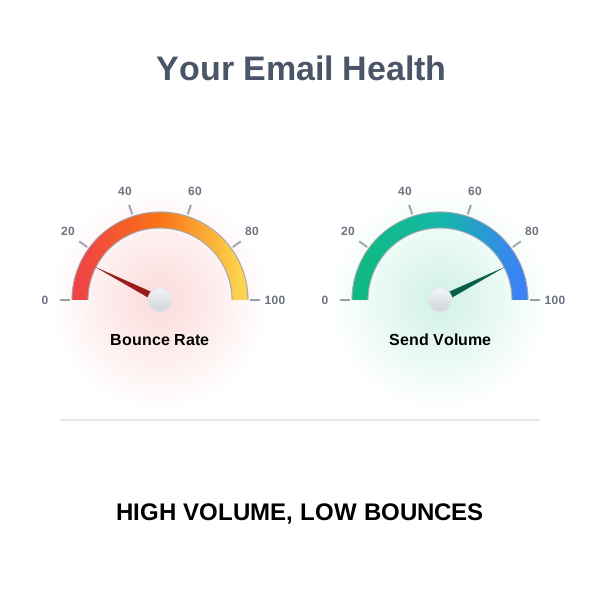
A high bounce rate damages your sender reputation and deliverability. Mailbox providers (Gmail, Outlook, Yahoo) monitor bounce rates. Too many bounces signal that you’re sending to bad lists—a spam indicator.
Bounce rate benchmarks:
| Bounce Rate | Assessment | Action |
|---|---|---|
| Below 2% | Healthy | Continue normal sending |
| 2–5% | Warning | Review list source; verify before next campaign |
| Above 5% | Critical | Stop sending; clean list immediately; check domain health |
How to keep bounce rates low:
- Verify email addresses before sending
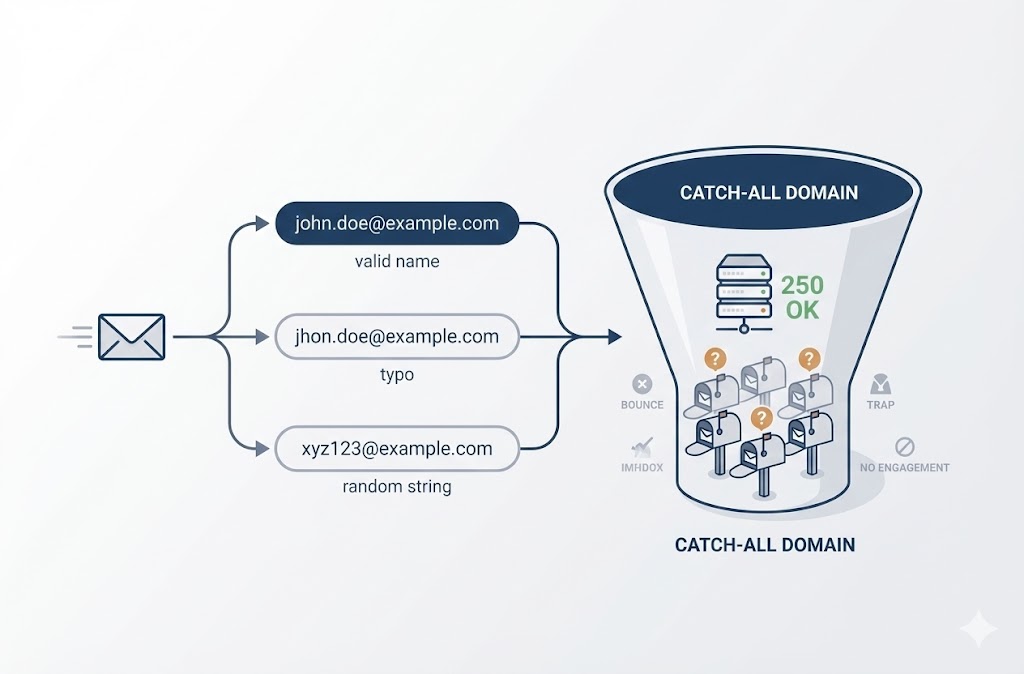
- Remove invalid, catch-all, and risky addresses from your list
- Don’t use purchased or scraped lists without verification
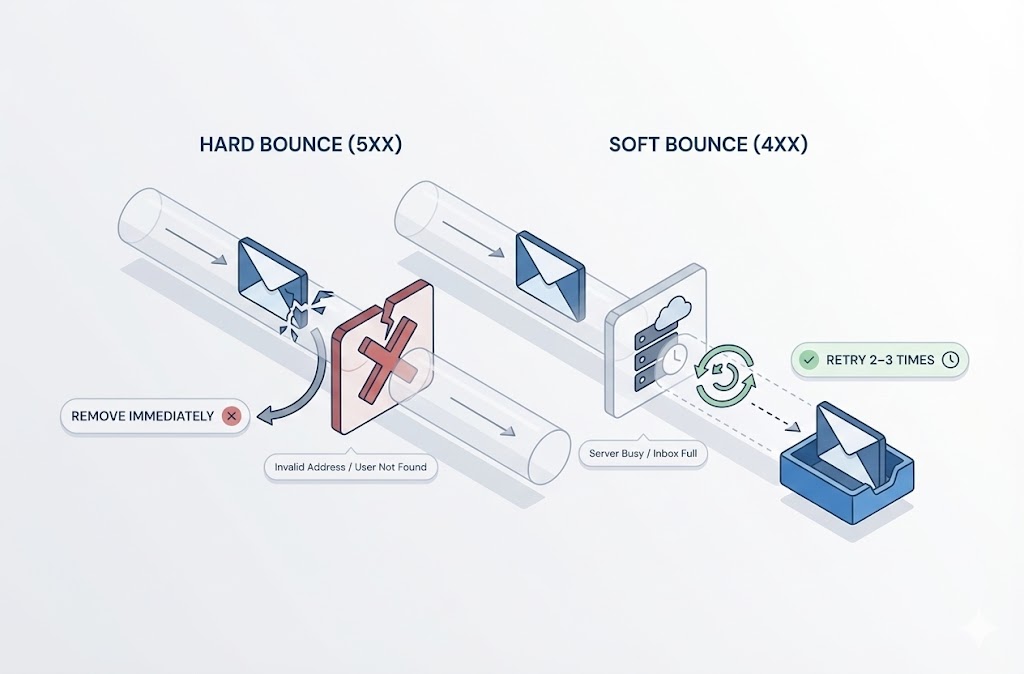
- Monitor bounces in real-time and remove hard bounces immediately
How to Improve Cold Email Response Rates
If your metrics are below benchmarks, diagnose systematically:
| Problem | Likely Cause | Fix |
|---|---|---|
| Low open rate (<30%) | Weak subject line or deliverability issues | Test new subject lines; check spam placement; warm up domain |
| High opens, low replies | Email content isn’t compelling | Rewrite body copy; strengthen value prop; simplify CTA |
| High bounce rate (>5%) | Bad list quality | Verify list before sending; remove invalid addresses |
| Replies but no conversions | Misaligned targeting or weak follow-up | Refine ICP; improve qualification; tighten follow-up sequence |
Improving cold email response rates in 2025 requires constant iteration. Test one variable at a time (subject line, opening line, CTA), measure results, and double down on what works.
When Is the Best Time to Send a Cold Email?
The best time to send a cold email is Tuesday through Thursday, between 8–10 AM or 1–3 PM in the recipient’s local time zone. These windows align with when professionals check email most actively—early morning before meetings start, or early afternoon after lunch. (Source)
Best Days to Send
| Day | Effectiveness | Why |
|---|---|---|
| Monday | Below average | Inbox overload from weekend; people triaging, not engaging |
| Tuesday | High | Workweek is underway; inbox is manageable |
| Wednesday | High | Mid-week focus; good engagement window |
| Thursday | High | Still in work mode; planning for week’s end |
| Friday | Below average | Winding down; less likely to engage with new outreach |
| Weekend | Low | Most professionals not checking work email |
Best Times to Send
| Time Window | Effectiveness | Why |
|---|---|---|
| 6–8 AM | Moderate | Early risers check email; risk of getting buried before work starts |
| 8–10 AM | High | First email check of the day; before meetings take over |
| 10 AM–12 PM | Moderate | Meeting-heavy hours; email gets deprioritized |
| 12–1 PM | Low | Lunch break; inbox neglected |
| 1–3 PM | High | Post-lunch inbox check; second peak engagement window |
| 3–6 PM | Moderate | Afternoon slump; wrapping up tasks |
| After 6 PM | Low | End of workday; personal time |
Time Zone Considerations
Always send based on the recipient’s time zone, not yours. An email sent at 9 AM Pacific arrives at 12 PM Eastern—less optimal. Most cold email tools allow you to schedule sends based on recipient location.
If you’re unsure of the recipient’s time zone:
- Check their LinkedIn location
- Look at the company headquarters
- Default to the time zone of your primary target market
Testing Your Own Timing
These benchmarks are starting points, not rules. Your audience may behave differently. A founder might check email at 6 AM. A sales director might live in their inbox all day. Enterprise buyers might be unreachable during Q4 planning.
How to test:
- Split your list into cohorts
- Send the same email at different times/days
- Measure open and reply rates by cohort
- Double down on what works for your specific audience
One variable at a time. Don’t change subject lines and send times simultaneously—you won’t know which factor drove the result.
Advanced: Managing Your Cold Email List
List quality determines the ceiling of your cold email performance. You can write perfect copy, nail your timing, and still fail if you’re sending to bad addresses. Managing your cold email list is the unglamorous work that separates amateurs from professionals.
Why List Hygiene Matters
Every email you send affects your sender reputation. Mailbox providers (Gmail, Outlook, Yahoo) track:
- Bounce rate — How many emails fail to deliver
- Spam complaints — How many recipients mark you as spam
- Engagement — Opens, replies, and clicks vs. ignores
High bounces and spam complaints signal that you’re sending unwanted email to bad addresses. The result: your emails start landing in spam folders instead of inboxes. Eventually, your domain gets blacklisted.
This is why list hygiene isn’t optional—it’s infrastructure.
Email Verification Before Sending
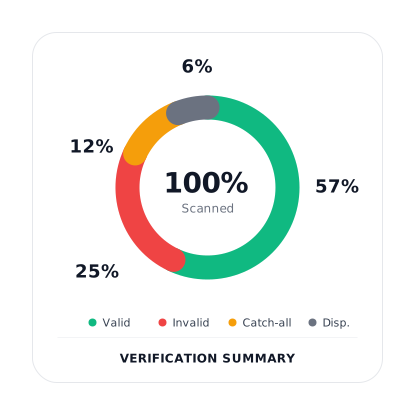
Email verification identifies invalid, risky, and low-quality addresses before you send. A verification tool checks each address and returns a status:
| Status | Meaning | Action |
|---|---|---|
| Valid | Address exists and can receive email | Safe to send |
| Invalid | Address doesn’t exist or is malformed | Remove from list |
| Catch-all | Domain accepts all emails; can’t confirm specific address | Send with caution or skip |
| Risky | Address may bounce or cause deliverability issues | Review manually; often skip |
| Role-based | Generic address (info@, support@, sales@) | Low conversion; usually skip for cold outreach |
| Disposable | Temporary email address | Remove from list |
Verify your list before every campaign. Email addresses decay at roughly 20–30% per year due to job changes, company closures, and domain expirations. A list that was clean six months ago may not be clean today.
How to Warm Up a Cold Email List
Warming up a cold email list means gradually re-engaging contacts you haven’t emailed in a while. If you blast a large, dormant list all at once, you’ll trigger spam filters and damage your sender reputation.
Steps to warm up a cold list:
- Verify first — Remove invalid and risky addresses before any sends
- Segment by recency — Separate contacts by how recently they engaged (opened, replied, clicked)
- Start small — Send to your most engaged segment first (50–100 emails)
- Monitor metrics — Watch bounce rate, spam complaints, and engagement
- Increase gradually — Add more volume over 2–4 weeks as metrics stay healthy
- Remove non-engagers — If contacts don’t open after 3–4 touches, suppress them
How to Re-engage a Cold Email List
Re-engagement targets contacts who previously engaged but have gone silent. These are warmer than net-new prospects but colder than active conversations.
Re-engagement approaches:
- “Still interested?” email — Short, direct check-in asking if they’re still exploring the topic
- New value angle — Share something new (feature, case study, insight) as a reason to reconnect
- Breakup email — Let them know you’ll stop emailing unless they respond; often triggers replies
- Different channel — Try LinkedIn or phone if email isn’t working
How to Create an Evergreen Cold Email Campaign
An evergreen cold email campaign runs continuously with fresh prospects entering and automated follow-ups executing. Instead of one-off blasts, you build a system.
Components of an evergreen campaign:
- Ongoing list building — New prospects added weekly or daily
- Verification on entry — Every new address verified before entering the sequence
- Automated sequence — Initial email + 2–3 follow-ups triggered automatically
- Exit rules — Prospects removed after reply, bounce, or unsubscribe
- Performance monitoring — Weekly review of open, reply, and bounce rates
- Continuous optimization — A/B testing subject lines, copy, and timing
Evergreen campaigns require more setup but generate predictable pipeline over time. The key is maintaining list quality—bad data entering the system will degrade performance gradually.
List Management Checklist
Before every campaign:
- ☐ Verify all email addresses
- ☐ Remove invalid and disposable addresses
- ☐ Flag or skip catch-all and role-based addresses
- ☐ Confirm list source is legitimate (not purchased from unknown vendors)
- ☐ Check that contacts match your ideal customer profile
- ☐ Ensure you haven’t emailed this list recently (avoid fatigue)
Ongoing:
- ☐ Remove hard bounces immediately
- ☐ Honor unsubscribe requests within 24 hours
- ☐ Suppress contacts who don’t engage after 4+ touches
- ☐ Re-verify lists older than 3–6 months
Frequently Asked Questions
What is a cold email?
A cold email is an unsolicited email sent to someone you have no prior relationship with. Unlike spam, a cold email is personalized, relevant to the recipient, and offers value. Sales teams, job seekers, researchers, and networkers use cold email to start conversations with people they haven’t met.
Is cold emailing illegal?
No. Cold emailing is legal in the United States under the CAN-SPAM Act, which permits unsolicited commercial email as long as you include accurate sender information, a physical address, and an opt-out mechanism. In the European Union, GDPR allows B2B cold email under “legitimate interest” if the outreach is relevant to the recipient’s professional role. Canada’s CASL is stricter and generally requires prior consent.
What is the difference between a cold email and a warm email?
A cold email goes to someone who has never interacted with you. A warm email goes to someone who already knows you exist—through a referral, previous conversation, social media interaction, or content engagement. Warm emails typically see higher response rates because the recipient has context for who you are.
How long should a cold email be?
A cold email should be 50–125 words. Shorter emails get higher response rates because busy professionals skim rather than read. If your email takes more than 30 seconds to read, it’s too long.
What is a good reply rate for cold email?
A good reply rate for cold email is 5–15%. Below 5% indicates issues with targeting, copy, or deliverability. Above 15% is excellent and typically reflects highly targeted lists and compelling messaging. Most replies come from follow-ups, not the initial email.
What is a good open rate for cold email?
A good open rate for cold email is 40–60%. Open rates below 30% suggest problems with your subject lines, sender reputation, or deliverability. Note that open tracking is increasingly affected by privacy features like Apple Mail Privacy Protection, so treat open rates as directional rather than precise.
How do I follow up on a cold email?
Send your first follow-up 3–4 days after the initial email. Add a new angle or piece of value—don’t just repeat your original message. A typical sequence includes 2–3 follow-ups spaced 5–7 days apart. The final email can be a “breakup” message letting the recipient know you’ll stop reaching out unless they respond.
What is a good subject line for a cold email?
A good subject line is short (3–7 words), specific to the recipient or their company, and curiosity-provoking without being clickbait. Examples: “{{company}}’s outbound deliverability,” “quick question,” “saw your post on {{topic}}.” Avoid generic phrases like “Introduction” or “Reaching out.”
How do I improve cold email response rates?
Diagnose the weak point first. Low open rates suggest subject line or deliverability issues. High opens but low replies indicate weak body copy or misaligned messaging. High bounces mean list quality problems. Test one variable at a time (subject line, opening line, CTA), measure results, and iterate.
Why is email verification important for cold email?
Email verification removes invalid, risky, and low-quality addresses from your list before you send. Sending to bad addresses generates bounces, which damage your sender reputation and can lead to your emails landing in spam folders. Verifying your list protects your domain and ensures more emails reach real inboxes.