What Is Data Enrichment? A Guide for Sales and Marketing Teams (2026)
10 January 2026
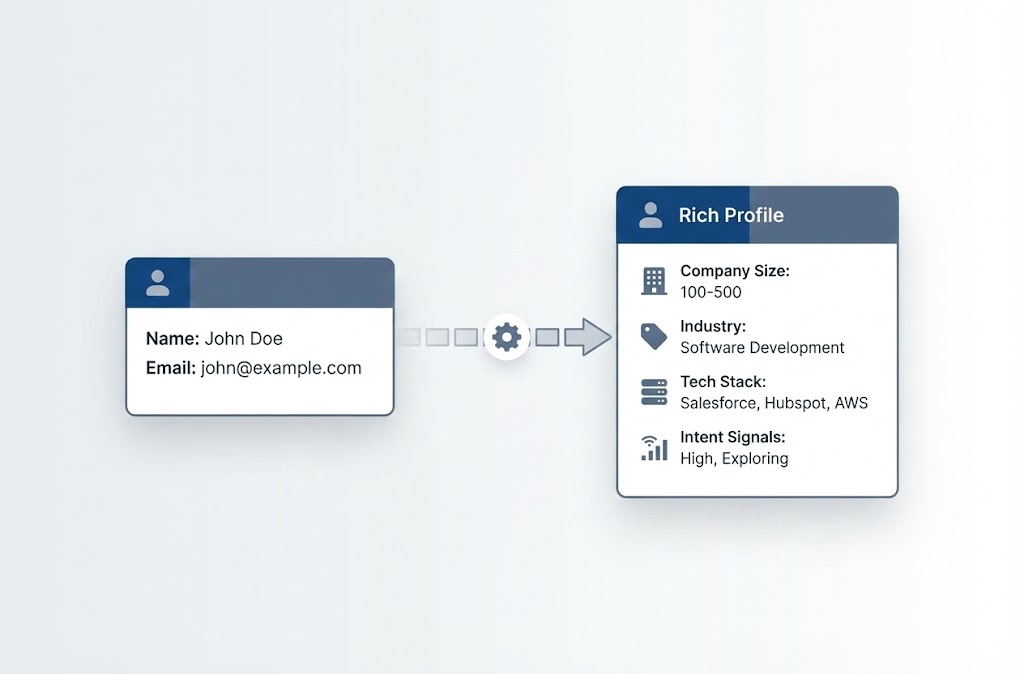
Data enrichment is the process of enhancing existing data records with additional information from internal or external sources. For sales and marketing teams, this means transforming a basic lead record (name + email) into a complete profile with company size, industry, tech stack, and buying signals—making every outreach more targeted and every campaign more efficient.
Table of Contents
- What Is Data Enrichment?
- Data Enrichment vs. Data Cleansing
- Types of Data Enrichment
- How Data Enrichment Works: The Process
- How Data Enrichment Reduces Marketing Costs
- How to Automate B2B Data Enrichment Workflows
- Which AI Is Best for GTM Data Enrichment?
- Data Enrichment Use Cases and Examples
- Frequently Asked Questions
Key Takeaways:
- Definition: Data enrichment adds missing attributes to your existing records—it doesn’t replace bad data, it completes incomplete data
- Types: Firmographic, demographic, technographic, and behavioral enrichment each serve different GTM use cases
- ROI impact: Enriched data reduces wasted ad spend, improves lead scoring accuracy, and shortens sales cycles
- Automation: Modern enrichment runs via API triggers, CRM workflows, and real-time form enrichment—not manual spreadsheet work
- Quality matters: Enrichment is only valuable if the source data is accurate and fresh; stale third-party data creates more problems than it solves
What Is Data Enrichment?
Data enrichment is the process of appending additional attributes to existing data records from internal or external sources. The goal is to transform incomplete information into actionable intelligence that sales and marketing teams can use immediately.
What Does Data Enrichment Mean in Practice?
Consider a typical scenario: a prospect fills out a form on your website with just their name and work email. Before enrichment, that’s all you have. After enrichment, you might know:
- Company name, size, and industry
- Job title and seniority level
- Company revenue and funding stage
- Technologies they use (CRM, marketing automation, etc.)
- Recent hiring activity or expansion signals
This turns a two-field lead into a qualified, scorable prospect.
A Simple Before-and-After Example
| Field | Before Enrichment | After Enrichment |
|---|---|---|
| Name | Sarah Chen | Sarah Chen |
| sarah@acmecorp.com | sarah@acmecorp.com | |
| Job Title | — | Director of Marketing Operations |
| Company Size | — | 250-500 employees |
| Industry | — | B2B SaaS |
| Tech Stack | — | Salesforce, HubSpot, Outreach |
| Funding Stage | — | Series B ($45M raised) |
Why GTM Teams Care About Enrichment
For sales and marketing operations, enrichment solves the “garbage in, garbage out” problem at the top of the funnel. Without enrichment:
- Lead scoring models lack inputs and produce unreliable scores
- Sales reps waste time researching prospects manually
- Marketing campaigns target broad audiences instead of ideal customer profiles
- Routing rules can’t assign leads to the right reps or sequences
Enrichment doesn’t fix bad data—that’s what data cleansing does. Enrichment completes records that are valid but incomplete.
Data Enrichment vs. Data Cleansing
Data enrichment adds new information to existing records. Data cleansing removes or corrects inaccurate, outdated, or duplicate data. These are complementary processes, not interchangeable terms.
Many teams confuse the two because both improve “data quality.” But they solve different problems:
- Cleansing fixes what’s broken (typos, invalid emails, duplicate contacts, outdated job titles)
- Enrichment fills what’s missing (company size, industry, tech stack, intent signals)
Head-to-Head Comparison
| Dimension | Data Cleansing | Data Enrichment |
|---|---|---|
| Primary goal | Remove errors and inconsistencies | Add missing attributes |
| What it does | Corrects, deduplicates, standardizes, validates | Appends, augments, enhances |
| Data sources | Internal (your own records) | Internal + external (third-party providers) |
| Example action | Fix “sarah@acmecrop.com” → “sarah@acmecorp.com” | Add “Director of Marketing Ops” to Sarah’s record |
| When to use | Before enrichment; ongoing hygiene | After cleansing; when records are valid but incomplete |
| Risk if skipped | Bounced emails, duplicates, wasted outreach | Poor segmentation, weak lead scoring, generic messaging |
The Correct Sequence: Cleanse First, Then Enrich
Enrichment depends on clean baseline data to work properly. If you enrich a record with an invalid email address, you’ve wasted the enrichment credit and still can’t reach the prospect.
The recommended workflow:
- Cleanse — Validate emails, remove duplicates, standardize formats
- Enrich — Append firmographic, technographic, and behavioral data
- Maintain — Schedule recurring cleansing to catch data decay
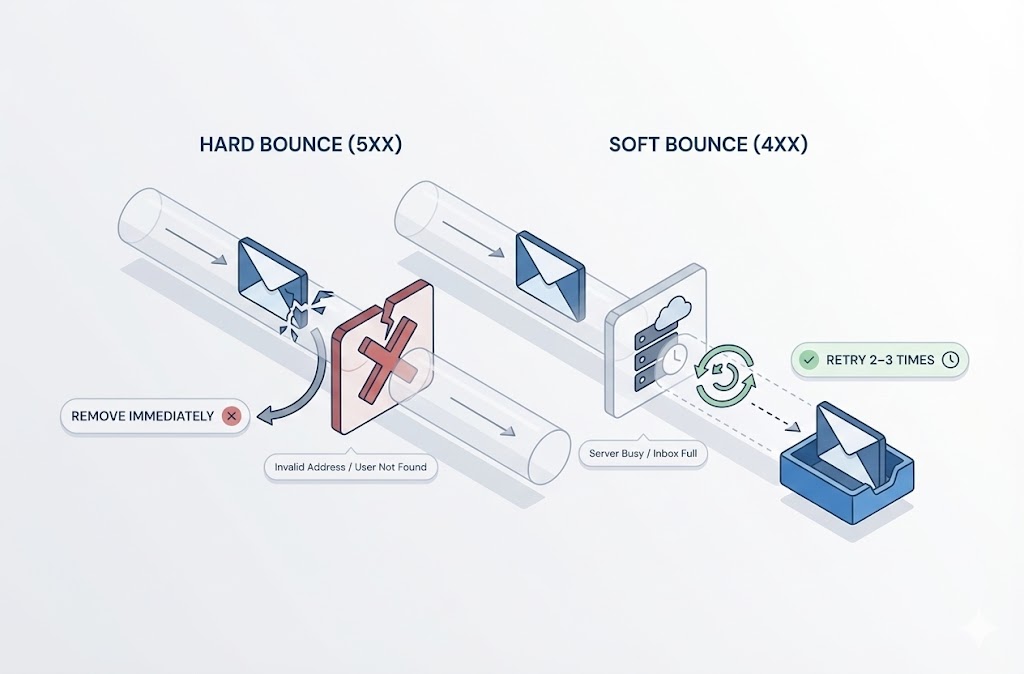
For email-heavy workflows, email verification is the cleansing step that should precede any enrichment. Verifying that an address is deliverable before spending enrichment credits protects both your budget and sender reputation.
Types of Data Enrichment
Data enrichment falls into four main categories based on the type of information appended. Each type serves different GTM use cases—understanding the distinctions helps you prioritize which enrichment matters most for your sales and marketing workflows.
Firmographic Enrichment
Firmographic enrichment adds company-level attributes to contact or account records. This is the foundation for B2B targeting and account-based marketing.
Common firmographic fields:
- Company name and domain
- Industry and sub-industry (SIC/NAICS codes)
- Employee count and revenue range
- Headquarters location and office locations
- Funding stage and total funding raised
- Year founded
GTM use case: Score inbound leads by company size and industry fit before routing to sales. Disqualify companies outside your ICP automatically.
Demographic Enrichment
Demographic enrichment adds individual-level attributes to contact records. For B2B, this typically means professional demographics rather than consumer data.
Common demographic fields:
- Job title and seniority level
- Department and function
- LinkedIn profile URL
- Education and work history
- Location (city, state, country)
GTM use case: Personalize outreach sequences based on role. Route VP+ titles to senior AEs; route managers to SDRs.
Technographic Enrichment
Technographic enrichment identifies the technology stack a company uses. This data is critical for selling software products that integrate with or replace existing tools.
Common technographic fields:
- CRM platform (Salesforce, HubSpot, Pipedrive)
- Marketing automation (Marketo, Pardot, Klaviyo)
- Sales engagement tools (Outreach, Salesloft, Apollo)
- Analytics and BI tools
- Cloud infrastructure (AWS, Azure, GCP)
GTM use case: Target companies using a competitor’s product. Prioritize prospects whose tech stack integrates with yours.
Behavioral Enrichment
Behavioral enrichment appends intent signals and activity data to records. Unlike static firmographic data, behavioral data changes frequently and indicates buying readiness.
Common behavioral signals:
- Content consumption (whitepapers downloaded, webinars attended)
- Website visits and page views
- Search behavior and topic interest
- Hiring activity (job postings in relevant categories)
- News triggers (funding rounds, leadership changes, expansions)
GTM use case: Trigger outreach when a target account shows intent signals. Prioritize accounts actively researching your category.
Comparison: Which Type Matters Most?
| Enrichment Type | Best For | Data Freshness | Typical Source |
|---|---|---|---|
| Firmographic | ICP qualification, account scoring | Updates quarterly/annually | Business databases, SEC filings, web scraping |
| Demographic | Personalization, lead routing | Updates when people change jobs | LinkedIn, professional directories |
| Technographic | Competitive targeting, integration selling | Updates monthly | Web scraping, technology detection |
| Behavioral | Intent-based prioritization, timing outreach | Updates daily/weekly | Intent data providers, first-party tracking |
Most B2B teams start with firmographic and demographic enrichment because these are stable and directly support lead scoring. Technographic and behavioral enrichment become valuable additions once core workflows are established.
How Data Enrichment Works: The Process
Data enrichment follows a structured workflow that moves from assessment to integration. Whether you’re enriching manually or via automation, the core steps remain the same.
The 6-Step Data Enrichment Process
- Define your enrichment goals Start by identifying which fields you actually need. Enriching every possible attribute wastes budget and clutters your CRM. Ask: What data gaps are blocking our lead scoring, segmentation, or personalization today?
- Audit your existing data Assess your current database for completeness. Calculate fill rates for key fields (job title, company size, industry). Records with valid emails but missing firmographic data are your enrichment candidates.
- Cleanse before enriching Remove duplicates, fix formatting inconsistencies, and validate email addresses. Enrichment fails when applied to invalid or duplicate records—you’ll pay for data you can’t use.
- Select data sources Choose between internal sources (your own web analytics, form submissions, product usage data) and external sources (third-party data providers). Most B2B enrichment combines both internal and external sources.
- Execute enrichment Run the enrichment process—either as a one-time bulk operation or as an automated real-time workflow. Match records by email domain, company name, or LinkedIn URL, then append the new fields.
- Validate and integrate Verify that enriched data meets quality standards. Check for match rates, accuracy on a sample set, and data freshness. Then push enriched records back into your CRM, MAP, or data warehouse.
Internal vs. External Data Sources
| Source Type | Examples | Pros | Cons |
|---|---|---|---|
| Internal (first-party) | CRM history, web analytics, form submissions, product usage, support tickets | Free, highly relevant, proprietary | Limited scope, only covers existing customers/prospects |
| External (third-party) | Data providers, public records, business databases, intent data vendors | Broad coverage, fills gaps you can’t fill internally | Costs per record, variable accuracy, freshness concerns |
Real-Time vs. Batch Enrichment
Two execution models exist for enrichment:
Batch enrichment processes large datasets on a scheduled basis—daily, weekly, or as a one-time project. Best for: initial database cleanup, periodic refresh cycles, enriching historical records.
Real-time enrichment triggers immediately when a new record enters your system—at form submission, CRM record creation, or API call. Best for: inbound lead qualification, instant lead routing, live personalization.
Most mature GTM teams use both models together: real-time enrichment for new leads, batch enrichment for database maintenance.
How Data Enrichment Reduces Marketing Costs
Data enrichment reduces marketing costs by eliminating waste at every stage of the funnel. When you know more about your prospects before spending money on them, you spend less reaching the wrong people.
The Cost of Incomplete Data
Without enrichment, marketing teams operate with partial information. This leads to:
- Wasted ad spend — Targeting broad audiences because you lack firmographic filters
- Low conversion rates — Generic messaging that doesn’t resonate with specific segments
- Sales inefficiency — Reps spending hours researching prospects instead of selling
- Poor lead scoring — Models that can’t distinguish hot leads from noise
Enrichment fixes these problems by giving you the inputs needed for precision targeting.
Where Enrichment Cuts Costs
| Cost Category | Problem Without Enrichment | How Enrichment Helps |
|---|---|---|
| Paid advertising | Broad targeting, low relevance scores, high CPM | Build matched audiences by company size, industry, tech stack |
| Email campaigns | One-size-fits-all messaging, low engagement | Segment by role, seniority, and company attributes for relevant content |
| Sales development | Reps manually research every lead (15-30 min each) | Auto-enrich on form fill; reps get complete profiles instantly |
| Lead scoring | Scoring models lack inputs, produce unreliable outputs | Score on firmographic fit + behavioral signals for accurate prioritization |
| Disqualification | Bad-fit leads clog pipeline, waste follow-up time | Auto-disqualify by company size, industry, or geography at entry |
Building the Business Case
When making the ROI argument for enrichment investment, focus on measurable improvements:
- Reduced cost per lead (CPL) — Better targeting means fewer impressions wasted on non-ICP accounts (Source)
- Higher marketing qualified lead (MQL) to sales qualified lead (SQL) conversion — Enriched lead scores are more accurate, so fewer MQLs get rejected by sales
- Shorter sales cycles — Reps start conversations with context instead of discovery questions
- Lower customer acquisition cost (CAC) — All of the above compound into more efficient spend
The ROI calculation compares enrichment costs against the cost savings from reduced waste and improved conversion. Even modest improvements in MQL-to-SQL rates typically justify enrichment investment.
How to Automate B2B Data Enrichment Workflows
Manual enrichment doesn’t scale for teams processing hundreds or thousands of leads per month. Automation moves enrichment from a periodic project to a continuous, embedded process.
Why Automate Enrichment?
When enrichment runs manually:
- New leads sit incomplete until someone runs a batch job
- Reps wait hours or days for data they need now
- Inconsistent processes lead to inconsistent data quality
- Staff time goes to repetitive tasks instead of analysis
Automated enrichment solves these problems by triggering enrichment at the moment data enters your system.
Common Automation Triggers
| Trigger Event | What Happens | Use Case |
|---|---|---|
| Form submission | New lead enriched before entering CRM | Inbound lead qualification and routing |
| CRM record creation | Contact or account enriched on save | Outbound list building, manual imports |
| Email verification | Valid emails trigger enrichment; invalid emails skip | Protect enrichment budget from wasted credits |
| Scheduled batch | Database enriched nightly or weekly | Refresh stale records, catch data decay |
| Webhook from external tool | Enrichment fires when data arrives from any source | Multi-tool workflows, custom integrations |
Automation Methods: From Simple to Advanced
- Spreadsheet add-ons Google Sheets or Excel add-ons let small teams enrich data without leaving their spreadsheets. Upload a list, click enrich, download results. Best for: ad-hoc projects, teams without CRM automation skills.
- Native CRM integrations Many enrichment providers offer direct integrations with Salesforce, HubSpot, and other CRMs. Records enrich automatically based on workflow rules you configure. Best for: teams with existing CRM automation.
- Workflow automation platforms Tools like Zapier, n8n, and Make connect enrichment APIs to any trigger and any destination. Build custom workflows without code: form submission → verify email → enrich → add to CRM → notify rep. Best for: multi-step workflows, custom logic.
- Direct API integration REST APIs give developers full control over when and how enrichment runs. Call the API from your own application, webhook handler, or backend process. Best for: product-embedded enrichment, high-volume pipelines, custom applications.
Example Workflow: Inbound Lead Enrichment
A typical automated inbound workflow:
- Prospect submits form with name and email
- Email verification checks deliverability
- If valid → enrichment API appends firmographic and demographic data
- Lead score calculated using enriched fields
- Routing rules assign lead to correct rep or sequence
- Rep receives Slack notification with complete profile
This entire sequence completes in seconds rather than hours.
Protecting Your Enrichment Budget
Enrichment providers charge per record. Two practices protect your budget:
- Verify before enriching — Invalid emails waste enrichment credits. Run email verification first to filter out undeliverable addresses.
- Enrich selectively — Not every record needs full enrichment. Use conditional logic to enrich only leads that meet minimum criteria (valid email, business domain, target geography).
Which AI Is Best for GTM Data Enrichment?
AI-powered enrichment has become a standard feature in modern GTM data tools. But “AI” is a broad term—understanding what AI actually does in enrichment helps you evaluate tools without falling for marketing buzzwords.
What AI Does in Data Enrichment
AI and machine learning contribute to enrichment in three main ways:
- Entity matching and resolution AI models match incomplete records to the correct company or person—even when data is messy. “Acme Corp,” “ACME Corporation,” and “acme.com” all resolve to the same account.
- Data inference and prediction When direct data isn’t available, AI predicts likely values based on patterns. Employee count estimated from LinkedIn headcount growth. Revenue estimated from hiring velocity and funding data.
- Web scraping and extraction AI extracts structured data from unstructured sources—company websites, news articles, job postings, social profiles—and normalizes it into usable fields.
Evaluation Criteria: What to Look For
Rather than asking “which AI is best,” ask how well a tool performs on the metrics that matter for GTM use cases.
| Criterion | What It Means | Questions to Ask |
|---|---|---|
| Match rate | Percentage of records successfully enriched | What’s the typical match rate for B2B contacts? For SMB vs. enterprise? |
| Accuracy | How often enriched data is correct | How do you measure accuracy? Can I audit a sample before committing? |
| Coverage | Breadth of companies and contacts in the database | What’s your coverage for [my target market/geography/company size]? |
| Freshness | How recently data was verified or updated | How often do you refresh records? What’s the average data age? |
| Field depth | Range of attributes available for enrichment | Which firmographic, technographic, and intent fields do you provide? |
| Integration options | How enrichment connects to your stack | Do you offer native CRM integrations? API? Workflow automation support? |
Red Flags When Evaluating AI Enrichment Tools
Watch for these warning signs:
- No accuracy metrics disclosed — If a vendor won’t share match rates or accuracy benchmarks, assume the numbers aren’t good
- “Unlimited” enrichment claims — Enrichment has real costs; unlimited usually means throttled or low-quality data
- No sample or trial — Reputable providers let you test on your own data before buying
- Stale data presented as fresh — Ask when records were last verified, not just when they were added
AI Enrichment for Different GTM Motions
| GTM Motion | Priority Enrichment Type | AI Capability That Matters Most |
|---|---|---|
| Inbound lead qualification | Firmographic + demographic | Real-time matching speed, high match rate on email-only inputs |
| Outbound prospecting | Contact discovery + technographic | Email accuracy, coverage depth in target segments |
| Account-based marketing | Firmographic + intent signals | Account-level matching, behavioral signal freshness |
| Customer expansion | Technographic + hiring signals | Change detection, trigger event identification |
The “best” AI for GTM enrichment depends on your specific motion, target market, and integration requirements—not on generic AI capabilities.
Data Enrichment Use Cases and Examples
Data enrichment drives measurable improvements across sales and marketing workflows. The following use cases show how enrichment translates into operational outcomes—not just cleaner data.
Use Case 1: Lead Scoring Improvement
Problem: Lead scoring models produce unreliable results because most inbound leads have only name and email. Reps waste time on leads that look identical but have vastly different fit.
How enrichment helps:
- Append company size, industry, and job title at form submission
- Feed enriched fields into scoring model as weighted inputs
- High-fit leads (right company size + decision-maker title) score higher automatically
Before and after:
| Metric | Before Enrichment | After Enrichment |
|---|---|---|
| Scoring model inputs | 2 fields (name, email) | 8+ fields (title, seniority, company size, industry, tech stack, etc.) |
| Lead prioritization | First-in-first-out or random | Score-based, fit-weighted |
| Sales confidence in MQLs | Low—reps ignore scores | High—scores reflect actual fit |
Use Case 2: Account-Based Marketing Targeting
Problem: ABM campaigns require firmographic precision, but your target account list has gaps. Company size is missing for 40% of accounts. Industry classifications are inconsistent. (Source)
How enrichment helps:
- Enrich account list with standardized firmographic data
- Fill gaps in employee count, revenue range, and industry codes
- Build matched audiences in ad platforms using consistent attributes
Example: A B2B SaaS company targeting mid-market fintech firms enriches their account list and discovers 30% of “target accounts” are actually outside their ICP (wrong size or industry). Removing these accounts reduces wasted ad spend before the campaign launches. (Source)
Use Case 3: Sales Outreach Personalization
Problem: SDRs send generic outreach because they lack context about prospects. Response rates are low. Personalization takes too long to do manually.
How enrichment helps:
- Enrich contacts with job title, seniority, and company details
- Append technographic data (what tools they use)
- Feed enriched data into email templates as merge fields
Personalization example:
| Without Enrichment | With Enrichment |
|---|---|
| “Hi Sarah, I wanted to reach out about our product…” | “Hi Sarah, I noticed Acme Corp recently expanded your sales team. As Director of Marketing Ops managing HubSpot and Outreach, you might be dealing with…” |
Relevant outreach earns higher response rates than generic templates.
Use Case 4: Inbound-to-Outbound Conversion
Problem: Website visitors show intent but don’t convert. You have IP data showing which companies visit, but no contact details.
How enrichment helps:
- Identify companies from IP addresses (reverse IP lookup)
- Enrich company records with firmographic data
- Append contact details for relevant buyers at those companies
- Trigger outbound sequences to high-intent accounts
Workflow: Anonymous visit → company identified → enriched with contacts → added to SDR sequence → personalized outreach within 24 hours.
Use Case 5: Data Hygiene and Decay Prevention
Problem: CRM data decays over time. People change jobs. Companies get acquired. After 12 months, a significant portion of your database is outdated.
How enrichment helps:
- Schedule recurring enrichment to refresh stale records
- Flag contacts whose job titles or companies have changed
- Update firmographic fields as companies grow or pivot
Data decay affects an estimated 20-30% of B2B contact data annually. Regular enrichment keeps your database current. (Source)
What Are the Best Data Enrichment Tools?
Data enrichment tools fall into several categories based on functionality:
| Tool Category | What It Does | Best For |
|---|---|---|
| Standalone enrichment platforms | Dedicated enrichment via API, bulk upload, or integrations | Teams needing flexible, high-volume enrichment |
| CRM-native enrichment | Built into Salesforce, HubSpot, or other CRMs | Teams wanting minimal integration work |
| Sales intelligence platforms | Enrichment bundled with prospecting and intent data | Outbound-heavy sales teams |
| Data integration platforms | Enrichment as part of broader ETL/data pipeline | Data teams managing warehouse-first architectures |
| Workflow automation + enrichment APIs | Connect any enrichment API to custom triggers | Teams with specific workflow requirements |
The “best” tool depends on your existing stack, volume, budget, and primary use case.
Frequently Asked Questions
Who Provides Top GTM Data Enrichment Services?
The GTM data enrichment market includes a range of providers with different strengths. Rather than recommending specific vendors, evaluate providers against these criteria: Coverage depth — Does the provider have strong data for your target market (geography, company size, industry)? Enrichment types — Do they offer the specific fields you need (firmographic, technographic, intent)? Integration options — Can you connect via API, native CRM integration, or workflow automation? Pricing model — Per-record, subscription, or credits-based? Does it fit your volume? Data freshness — How often do they verify and update records? Request a sample enrichment on your own data before committing. Match rates and accuracy vary significantly by target segment.
What Is the Difference Between Data Enhancement and Data Enrichment?
These terms are often used interchangeably in the industry. When a distinction is made: Data enrichment typically refers to appending new attributes from external sources Data enhancement sometimes refers to the broader process of improving data quality, including cleansing, standardization, and enrichment In practice, most vendors and practitioners treat them as synonyms. Don’t get hung up on terminology—focus on what specific data transformations you need.
Is Data Enrichment GDPR Compliant?
Data enrichment can be GDPR compliant, but compliance depends on how you source and use the data. Key compliance considerations: Lawful basis — You need a lawful basis (legitimate interest, consent, or contract) to process personal data, including enriched data Data source transparency — Know where your enrichment provider sources data and whether that collection was compliant Purpose limitation — Use enriched data only for purposes compatible with why it was collected Data subject rights — Be prepared to honor access, correction, and deletion requests for enriched data Vendor due diligence — Ensure your enrichment provider has appropriate data processing agreements and compliance certifications B2B contact data typically relies on legitimate interest as the lawful basis, but you should document your legitimate interest assessment and ensure your provider can demonstrate compliant sourcing. This is general guidance, not legal advice. Consult a privacy professional for compliance specific to your situation.
What Data Sources Are Used for Data Enrichment?
Enrichment providers aggregate data from multiple source categories: Public sources: Company websites and about pages SEC filings and business registrations Job postings and career pages Press releases and news articles Social media profiles (LinkedIn, Twitter) Proprietary sources: Purchased business databases Data partnerships and exchanges Web scraping and crawling infrastructure User-contributed data (with consent) First-party sources (your own data): CRM and marketing automation records Website analytics and behavioral tracking Product usage data Support and sales interaction history Most robust enrichment combines multiple source types to maximize coverage and cross-validate accuracy.